Description:
There’s every classic game you can imagine, without any advertising or additional costs. Let you play non-repetitive games every day, bringing you back to Childhood Memories instantly .
How to Use the Retro Game console
1.Before connecting the power supply, insert the TF card.
2.Insert the game stick into the TV/Computer HDMI interface.
3.Using the charging adapter to connect to the power will automatically turn on.
4.Use the game controller to select the game you want to play.
- Plug and play, comfortable feel, you can better Enjoy the fun of classic nostalgic games with family or friends.
- Press the SELECT key to enter the system Settings: you can set language, sound effects.
- Press SELECT key +START key: When you hold down the two keys in the game at the same time to return to the main menu, choose to quit the game, enter the game menu interface.
- Press R1 and L1 to select the game mode.
- Press R2 to save your favorite game (a five-pointed star appears behind the game name indicating successful collection, press R2 again to cancel the collection and the five-pointed star will disappear).
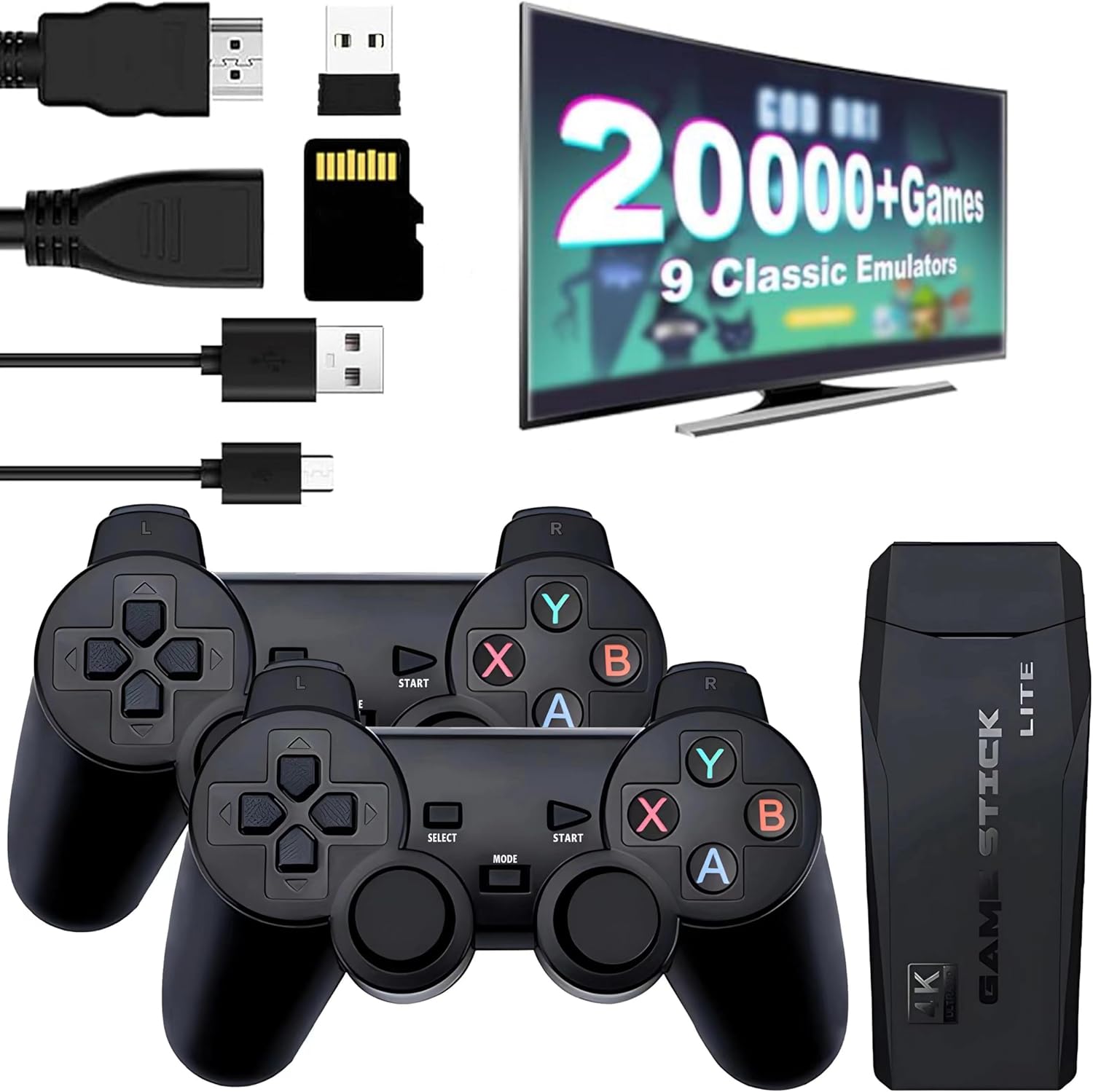
The package of the game stick includes:
2 X Controllers
1 X Game Stick
1 X USB cable
1 X 64G TF card
1 X User Manual
Note:
1. If you experience problems with the gaming interface display, simply reinsert the HDMI cable or unplug the cable and reinsert the joystick and receiver.
2. If the game controller operation is not smooth, please turn off and then restart the switch.
Details:
Visit the Tonies Store
Retro Game Console - Retro Play Game Stick,Nostalgia Stick Game,9 Classic Emulators,4K HDMI Output,Plug and Play Game Stick with 2 Controllers(64G)
QAR22757
Quantity:
Order today to get by 7-14 business days
This item qualifies for free delivery
 Imported From: United States
At BOLO, we work hard to ensure the products you receive are new, genuine, and sourced from reputable suppliers.
Every product in the BOLO catalogue is sourced through our Verified Global Supply Network of verified sellers, authorized distributors or directly from the manufacturer.
Each product undergoes thorough inspection and verification at our consolidation and fulfilment centers to ensure it meets our strict authenticity and quality standards before being shipped and delivered to you.
If you ever have concerns regarding the authenticity of a product purchased from us, please contact Bolo Support. We will review your inquiry promptly and, if necessary, provide documentation verifying authenticity or offer a suitable resolution.
Your trust is our top priority, and we are committed to maintaining transparency and integrity in every transaction.
While we strive to display accurate information, variations in packaging, labeling, instructions, or formulation may occasionally occur due to regional differences or supplier updates. For detailed or manufacturer-specific information, please contact the brand directly or reach out to BOLO Support for assistance.
Unless otherwise stated, all prices displayed on the product page include applicable taxes and import duties.
BOLO operates in accordance with the laws and regulations of Qatar. Any items found to be restricted or prohibited for sale within the Qatar will be cancelled prior to shipment. We take proactive measures to ensure that only products permitted for sale in Qatar are listed on our website.
All items are shipped by air, and any products classified as “Dangerous Goods (DG)” under IATA regulations will be removed from the order and cancelled.
All orders are processed manually, and we make every effort to process them promptly once confirmed. Products cancelled due to the above reasons will be permanently removed from listings across the website.
More from this brand
Similar items from “Plug & Play Video Games”
Share with
Or share with link
https://www.bolo.qa/products/UO0S7UQ77JD
Visit the Tonies Store
Retro Game Console - Retro Play Game Stick,Nostalgia Stick Game,9 Classic Emulators,4K HDMI Output,Plug and Play Game Stick with 2 Controllers(64G)
QAR22757
Quantity:
Order today to get by 7-14 business days
This item qualifies for free delivery
Imported From: United States
At BOLO, we work hard to ensure the products you receive are new, genuine, and sourced from reputable suppliers.
Every product in the BOLO catalogue is sourced through our Verified Global Supply Network of verified sellers, authorized distributors or directly from the manufacturer.
Each product undergoes thorough inspection and verification at our consolidation and fulfilment centers to ensure it meets our strict authenticity and quality standards before being shipped and delivered to you.
If you ever have concerns regarding the authenticity of a product purchased from us, please contact Bolo Support. We will review your inquiry promptly and, if necessary, provide documentation verifying authenticity or offer a suitable resolution.
Your trust is our top priority, and we are committed to maintaining transparency and integrity in every transaction.
While we strive to display accurate information, variations in packaging, labeling, instructions, or formulation may occasionally occur due to regional differences or supplier updates. For detailed or manufacturer-specific information, please contact the brand directly or reach out to BOLO Support for assistance.
Unless otherwise stated, all prices displayed on the product page include applicable taxes and import duties.
BOLO operates in accordance with the laws and regulations of Qatar. Any items found to be restricted or prohibited for sale within the Qatar will be cancelled prior to shipment. We take proactive measures to ensure that only products permitted for sale in Qatar are listed on our website.
All items are shipped by air, and any products classified as “Dangerous Goods (DG)” under IATA regulations will be removed from the order and cancelled.
All orders are processed manually, and we make every effort to process them promptly once confirmed. Products cancelled due to the above reasons will be permanently removed from listings across the website.
Description:
There’s every classic game you can imagine, without any advertising or additional costs. Let you play non-repetitive games every day, bringing you back to Childhood Memories instantly .
How to Use the Retro Game console
1.Before connecting the power supply, insert the TF card.
2.Insert the game stick into the TV/Computer HDMI interface.
3.Using the charging adapter to connect to the power will automatically turn on.
4.Use the game controller to select the game you want to play.
- Plug and play, comfortable feel, you can better Enjoy the fun of classic nostalgic games with family or friends.
- Press the SELECT key to enter the system Settings: you can set language, sound effects.
- Press SELECT key +START key: When you hold down the two keys in the game at the same time to return to the main menu, choose to quit the game, enter the game menu interface.
- Press R1 and L1 to select the game mode.
- Press R2 to save your favorite game (a five-pointed star appears behind the game name indicating successful collection, press R2 again to cancel the collection and the five-pointed star will disappear).
The package of the game stick includes:
2 X Controllers
1 X Game Stick
1 X USB cable
1 X 64G TF card
1 X User Manual
Note:
1. If you experience problems with the gaming interface display, simply reinsert the HDMI cable or unplug the cable and reinsert the joystick and receiver.
2. If the game controller operation is not smooth, please turn off and then restart the switch.
Details:
More from this brand
Similar items from “Plug & Play Video Games”
Share with
Or share with link
https://www.bolo.qa/products/UO0S7UQ77JD