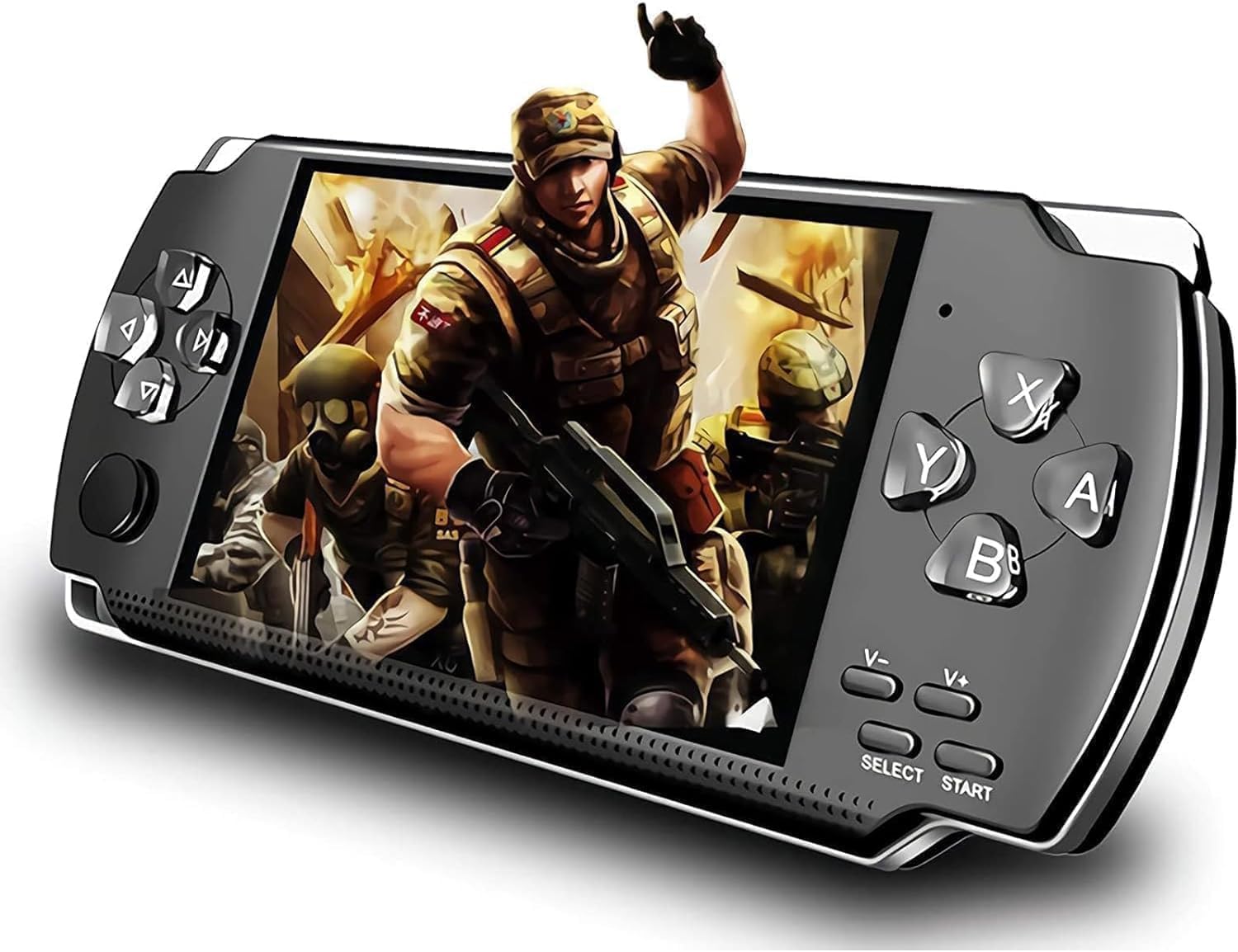
Description:
Built-in 1200+ real no-repeat old school classic games, super classic games covering a variety of types of games, such as adventure, shooting, action, racing and so on. and other classic FC games. You can play more than 1200 built-in games anytime and anywhere.
Note: After turning on the ON/OFF button, please press start button to start the console. Since we have many games built into the console, only some of them are shown on the desktop, for more games, please select the "game" icon in the lower left corner to view them.
Specifications:
Screen: 4.3 inches, 260,000 full-color TFT screen
Battery: Built-in 1500 mAh battery, the movie about four hours, MP3 music 8 hours. Multi Language: English, Japanese, Korean, Spanish, Portuguese, Russian, Italian French, German.
Game features: support 8 emulators, 8-128 the following games, online games Video: supporting format of AVI, WM FLV,RM, RMVE, MP4, 3GP, MPEG, VOB, DAT and SWF.
Music: supporting format of WMA, OGG, MP3, APE, FLAC, WAV, ACC play in format.
Audio recording built-in microphone, stopwatch\calculator\calendar function, Learning features support eBook, Lyrics synchronization support two-line display lyrics ,File storage any storage file browser, delete, copy and other operations, data manager Point Play.
Control and regulation: does not support multi-tasking operations. External expansion card: maximum support 32GB TF Card. AV cable not include.
How to find more games?
Find the "Games" icon in the lower left corner of the screen, press the "A" key to enter, select "built-in game"or"Optional Game"---"Dir List", press the "A" key to enter, you will see more games.
How to archive game?
When playing the game, press "SELECT" to exit the game then select "save game" in the menu, press A to determine, a game saves up to six game progress.
If you want to follow the previous game schedule, after entering the game, press "SELECT"-"load schedule" to do so.
How to add games\game delete?
Contact us to get more game download URL.
1.When connected to the computer, you can see the tour in the "GMAE" file.The game can be deleted, but the game fixed in the machine can not be seen on the computer, it can not be deleted.
2.How to download the game? Users can search for games online, download the games to the computer first, and then use USB.Connect the game console to the computer and copy the downloaded game from the computer to GAME in the game console.Folder (Game File Suffix Name: gba/gbc/gb/sfc/nes, due to downloaded games from various websitesFiles may be different. Sometimes there will be situations that do not support them. Please delete them and download them on other websites.
Troubleshooting
1.Game consoles can't boot
Check if the battery is running out. Connect to USB or charger and try to restart it after charging.
2.No sound can be heard in headphones
Please check if the volume is set to 0.
Please check if the headphone is inserted into the jack correctly.
3.Serious noise
Please check that the plug of the headphone is clean. Dirt can cause noise. Please check if the music file is damaged and try playing other music to make sure.
If the file has been damaged, it may cause damage.To produce a very serious noise or jump.
4.Screen display scrambling
Check that the correct language options have been set
5.Unable to dowrtoad files
Make sire that the computer is properly connected to the game console
Make sure that the storage space of the internal memory is full
Make sire the USB connection is damaged.
Package Included:
1x Handheld Game Console
1x Earphone
1x USB Cable
1x User Instructions
Details:
Handheld Game Console, Built-in 1200 Games 4.3’’ HD Screen Retro Gaming System, Portable Rechargeable Game Console with Dual Joystick, Support TV Output, Best Gift for Adult
QAR27177
Quantity:
Order today to get by 7-14 business days
This item qualifies for free delivery
 Imported From: United States
At BOLO, we work hard to ensure the products you receive are new, genuine, and sourced from reputable suppliers.
Every product in the BOLO catalogue is sourced through our Verified Global Supply Network of verified sellers, authorized distributors or directly from the manufacturer.
Each product undergoes thorough inspection and verification at our consolidation and fulfilment centers to ensure it meets our strict authenticity and quality standards before being shipped and delivered to you.
If you ever have concerns regarding the authenticity of a product purchased from us, please contact Bolo Support. We will review your inquiry promptly and, if necessary, provide documentation verifying authenticity or offer a suitable resolution.
Your trust is our top priority, and we are committed to maintaining transparency and integrity in every transaction.
While we strive to display accurate information, variations in packaging, labeling, instructions, or formulation may occasionally occur due to regional differences or supplier updates. For detailed or manufacturer-specific information, please contact the brand directly or reach out to BOLO Support for assistance.
Unless otherwise stated, all prices displayed on the product page include applicable taxes and import duties.
BOLO operates in accordance with the laws and regulations of Qatar. Any items found to be restricted or prohibited for sale within the Qatar will be cancelled prior to shipment. We take proactive measures to ensure that only products permitted for sale in Qatar are listed on our website.
All items are shipped by air, and any products classified as “Dangerous Goods (DG)” under IATA regulations will be removed from the order and cancelled.
All orders are processed manually, and we make every effort to process them promptly once confirmed. Products cancelled due to the above reasons will be permanently removed from listings across the website.
Similar suggestions by Bolo
Similar items from “Plug & Play Video Games”
Share with
Or share with link
https://www.bolo.qa/products/UO0QC95UDFY
Handheld Game Console, Built-in 1200 Games 4.3’’ HD Screen Retro Gaming System, Portable Rechargeable Game Console with Dual Joystick, Support TV Output, Best Gift for Adult
QAR27177
Quantity:
Order today to get by 7-14 business days
This item qualifies for free delivery
Imported From: United States
At BOLO, we work hard to ensure the products you receive are new, genuine, and sourced from reputable suppliers.
Every product in the BOLO catalogue is sourced through our Verified Global Supply Network of verified sellers, authorized distributors or directly from the manufacturer.
Each product undergoes thorough inspection and verification at our consolidation and fulfilment centers to ensure it meets our strict authenticity and quality standards before being shipped and delivered to you.
If you ever have concerns regarding the authenticity of a product purchased from us, please contact Bolo Support. We will review your inquiry promptly and, if necessary, provide documentation verifying authenticity or offer a suitable resolution.
Your trust is our top priority, and we are committed to maintaining transparency and integrity in every transaction.
While we strive to display accurate information, variations in packaging, labeling, instructions, or formulation may occasionally occur due to regional differences or supplier updates. For detailed or manufacturer-specific information, please contact the brand directly or reach out to BOLO Support for assistance.
Unless otherwise stated, all prices displayed on the product page include applicable taxes and import duties.
BOLO operates in accordance with the laws and regulations of Qatar. Any items found to be restricted or prohibited for sale within the Qatar will be cancelled prior to shipment. We take proactive measures to ensure that only products permitted for sale in Qatar are listed on our website.
All items are shipped by air, and any products classified as “Dangerous Goods (DG)” under IATA regulations will be removed from the order and cancelled.
All orders are processed manually, and we make every effort to process them promptly once confirmed. Products cancelled due to the above reasons will be permanently removed from listings across the website.
Description:
Built-in 1200+ real no-repeat old school classic games, super classic games covering a variety of types of games, such as adventure, shooting, action, racing and so on. and other classic FC games. You can play more than 1200 built-in games anytime and anywhere.
Note: After turning on the ON/OFF button, please press start button to start the console. Since we have many games built into the console, only some of them are shown on the desktop, for more games, please select the "game" icon in the lower left corner to view them.
Specifications:
Screen: 4.3 inches, 260,000 full-color TFT screen
Battery: Built-in 1500 mAh battery, the movie about four hours, MP3 music 8 hours. Multi Language: English, Japanese, Korean, Spanish, Portuguese, Russian, Italian French, German.
Game features: support 8 emulators, 8-128 the following games, online games Video: supporting format of AVI, WM FLV,RM, RMVE, MP4, 3GP, MPEG, VOB, DAT and SWF.
Music: supporting format of WMA, OGG, MP3, APE, FLAC, WAV, ACC play in format.
Audio recording built-in microphone, stopwatch\calculator\calendar function, Learning features support eBook, Lyrics synchronization support two-line display lyrics ,File storage any storage file browser, delete, copy and other operations, data manager Point Play.
Control and regulation: does not support multi-tasking operations. External expansion card: maximum support 32GB TF Card. AV cable not include.
How to find more games?
Find the "Games" icon in the lower left corner of the screen, press the "A" key to enter, select "built-in game"or"Optional Game"---"Dir List", press the "A" key to enter, you will see more games.
How to archive game?
When playing the game, press "SELECT" to exit the game then select "save game" in the menu, press A to determine, a game saves up to six game progress.
If you want to follow the previous game schedule, after entering the game, press "SELECT"-"load schedule" to do so.
How to add games\game delete?
Contact us to get more game download URL.
1.When connected to the computer, you can see the tour in the "GMAE" file.The game can be deleted, but the game fixed in the machine can not be seen on the computer, it can not be deleted.
2.How to download the game? Users can search for games online, download the games to the computer first, and then use USB.Connect the game console to the computer and copy the downloaded game from the computer to GAME in the game console.Folder (Game File Suffix Name: gba/gbc/gb/sfc/nes, due to downloaded games from various websitesFiles may be different. Sometimes there will be situations that do not support them. Please delete them and download them on other websites.
Troubleshooting
1.Game consoles can't boot
Check if the battery is running out. Connect to USB or charger and try to restart it after charging.
2.No sound can be heard in headphones
Please check if the volume is set to 0.
Please check if the headphone is inserted into the jack correctly.
3.Serious noise
Please check that the plug of the headphone is clean. Dirt can cause noise. Please check if the music file is damaged and try playing other music to make sure.
If the file has been damaged, it may cause damage.To produce a very serious noise or jump.
4.Screen display scrambling
Check that the correct language options have been set
5.Unable to dowrtoad files
Make sire that the computer is properly connected to the game console
Make sure that the storage space of the internal memory is full
Make sire the USB connection is damaged.
Package Included:
1x Handheld Game Console
1x Earphone
1x USB Cable
1x User Instructions
Details:
Similar suggestions by Bolo
Similar items from “Plug & Play Video Games”
Share with
Or share with link
https://www.bolo.qa/products/UO0QC95UDFY