Deliver toQatar
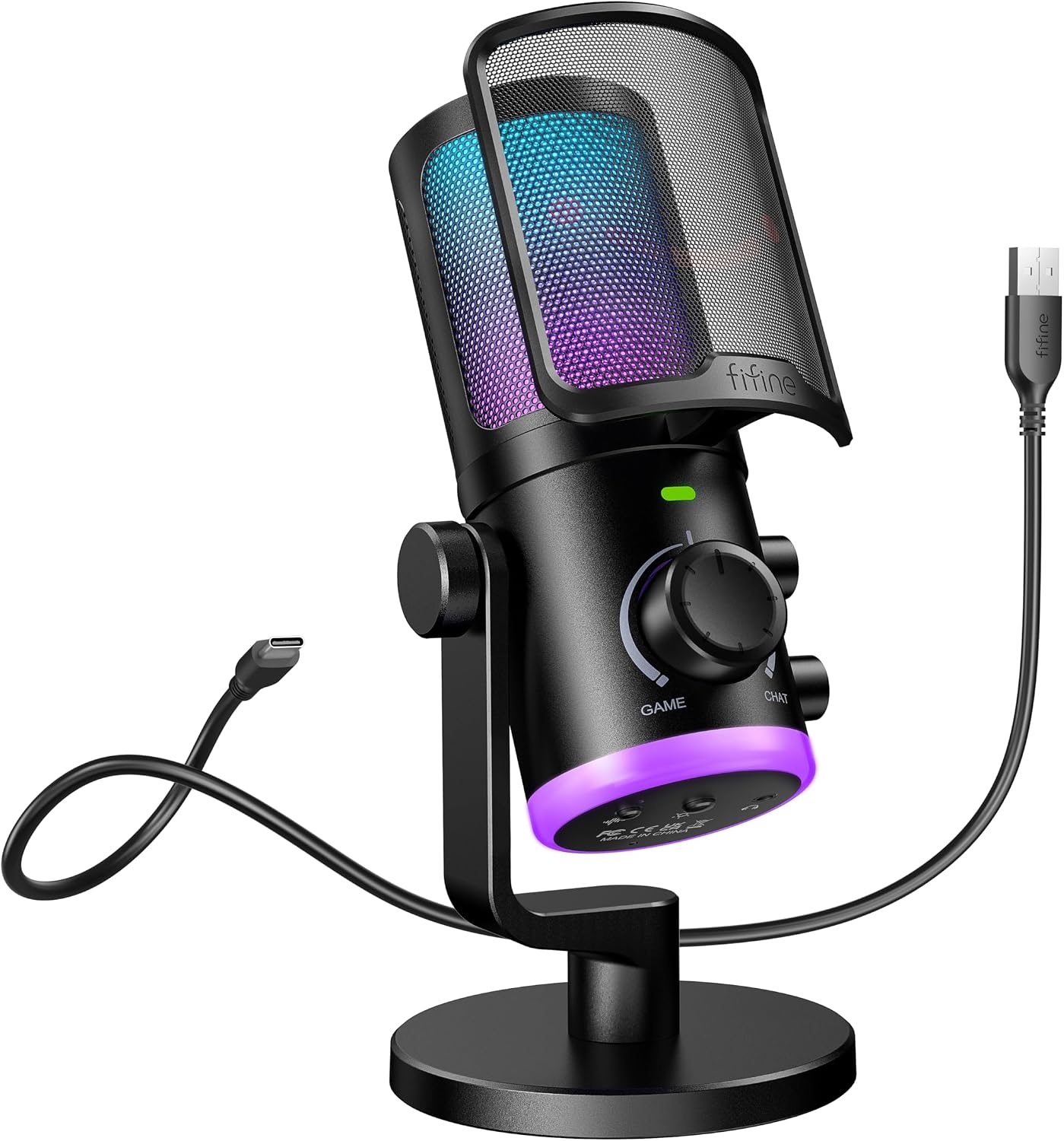
FIFINE Gaming PC Microphone, USB Streaming Microphone with Game Chat Balance, Computer Condenser Desktop RGB Mic with Mute Button, Noise Cancellation for Podcast/Twitch/Discord-AMPLIGAME AM6

Description:

  • [ChatMix Dial] Game:Voice balance on the PC gaming microphone lets you easily adjust the audio ratio of game to voice chat. Balance how much game sound and voice chat you want to hear, seamlessly shifting between immersion and strategy. Dial up the game audio to catch footsteps and rustling to lock the position of enemy for a competitive edge. When you stand apart from your squad, turn up the chat ratio to clearly hear the direction your teammate pointing for quicker reaction.
  • [Dual Mics Denoise] The USB microphone, utilizing technology of two mic denoise to keep out surrounding noise, synthesize and process two signal from voice and ambient sound. Gaming with your squad is full of strategic communication. Activate noise canceling button to shut down the sounds that keep you from performing your wish. The computer microphone delivers your clear commands and tactics to teammates who concentrate on your calling to reach new heights team work.
  • [Controllable RGB] The USB PC microphone features dual light effect with the top and underneath light design. Visualize the electrifying ambiance when you control the vibrant RGB lights up to your gaming experience. The RGB on streaming mic body match your LED wall lights and PC host flowing colors. The low-profile RGB underneath the mic creates an aesthetic with your glowing mouse pad and keyboard. The youtube microphone drops your computer setup into a vivid light show.
  • [Intuitive Function Use] Function keys on the condenser microphone simplify certain operations on PC. A tap to mute button cloaks your voice. Keep your league undisturbedly focusing on crucial in-game moments to take firm action. To follow up the pace of gaming, real-time monitoring lets you keep track of your voice beats. With gain knob and headphones volume control at your fingertips, easily amplify whispering breeze for intensity adventure or lower thundering explosion for quieter moments.
  • [Instant USB Setup] No complicated installations or drivers required for the podcast microphone. The USB microphone for PC is plug and play, providing instant compatibility of PS4/PS5/MAC OS/WINDOWS with your gaming setup. The desktop mic give simple way to connect and record. Spend more time gaming but less time troubleshooting.
  • Tips: 1) Game/Chat balanced knob function is only applicable to desktop, laptop or Mac, but unavailable for PS4/PS5. 2) Real-time monitoring is not activated by default on PC setup. Follow steps to activate real-time monitoring on PC. Click “Playback” tab from the Sound Panel-Double click “fifine Chat”-Levels-Click the speaker icon of microphone level to activate.
  • Details:

    FIFINE Gaming PC Microphone, USB Streaming Microphone with Game Chat Balance, Computer Condenser Desktop RGB Mic with Mute Button, Noise Cancellation for Podcast/Twitch/Discord-AMPLIGAME AM6

    Product ID: UO0PFSJI6PA
    |

    Returns & Warranty policies

    Imported From: United States

    At BOLO, we work hard to ensure the products you receive are new, genuine, and sourced from reputable suppliers.

    Every product in the BOLO catalogue is sourced through our Verified Global Supply Network of verified sellers, authorized distributors or directly from the manufacturer.

    Each product undergoes thorough inspection and verification at our consolidation and fulfilment centers to ensure it meets our strict authenticity and quality standards before being shipped and delivered to you.

    If you ever have concerns regarding the authenticity of a product purchased from us, please contact Bolo Support. We will review your inquiry promptly and, if necessary, provide documentation verifying authenticity or offer a suitable resolution.

    Your trust is our top priority, and we are committed to maintaining transparency and integrity in every transaction.

    While we strive to display accurate information, variations in packaging, labeling, instructions, or formulation may occasionally occur due to regional differences or supplier updates. For detailed or manufacturer-specific information, please contact the brand directly or reach out to BOLO Support for assistance.

    Unless otherwise stated, all prices displayed on the product page include applicable taxes and import duties.

    BOLO operates in accordance with the laws and regulations of Qatar. Any items found to be restricted or prohibited for sale within the Qatar will be cancelled prior to shipment. We take proactive measures to ensure that only products permitted for sale in Qatar are listed on our website.

    All items are shipped by air, and any products classified as “Dangerous Goods (DG)” under IATA regulations will be removed from the order and cancelled.

    All orders are processed manually, and we make every effort to process them promptly once confirmed. Products cancelled due to the above reasons will be permanently removed from listings across the website.

    Similar suggestions by Bolo

    More from this brand

    Similar items from “Computer Microphones”

    FIFINE Gaming PC Microphone, USB Streaming Microphone with Game Chat Balance, Computer Condenser Desktop RGB Mic with Mute Button, Noise Cancellation for Podcast/Twitch/Discord-AMPLIGAME AM6

    Product ID: UO0PFSJI6PA
    FIFINE Gaming PC Microphone, USB Streaming Microphone with Game Chat Balance, Computer Condenser Desktop RGB Mic with Mute Button, Noise Cancellation for Podcast/Twitch/Discord-AMPLIGAME AM6-0
    |

    Returns & Warranty policies

    Imported From: United States

    At BOLO, we work hard to ensure the products you receive are new, genuine, and sourced from reputable suppliers.

    Every product in the BOLO catalogue is sourced through our Verified Global Supply Network of verified sellers, authorized distributors or directly from the manufacturer.

    Each product undergoes thorough inspection and verification at our consolidation and fulfilment centers to ensure it meets our strict authenticity and quality standards before being shipped and delivered to you.

    If you ever have concerns regarding the authenticity of a product purchased from us, please contact Bolo Support. We will review your inquiry promptly and, if necessary, provide documentation verifying authenticity or offer a suitable resolution.

    Your trust is our top priority, and we are committed to maintaining transparency and integrity in every transaction.

    While we strive to display accurate information, variations in packaging, labeling, instructions, or formulation may occasionally occur due to regional differences or supplier updates. For detailed or manufacturer-specific information, please contact the brand directly or reach out to BOLO Support for assistance.

    Unless otherwise stated, all prices displayed on the product page include applicable taxes and import duties.

    BOLO operates in accordance with the laws and regulations of Qatar. Any items found to be restricted or prohibited for sale within the Qatar will be cancelled prior to shipment. We take proactive measures to ensure that only products permitted for sale in Qatar are listed on our website.

    All items are shipped by air, and any products classified as “Dangerous Goods (DG)” under IATA regulations will be removed from the order and cancelled.

    All orders are processed manually, and we make every effort to process them promptly once confirmed. Products cancelled due to the above reasons will be permanently removed from listings across the website.

    Description:

  • [ChatMix Dial] Game:Voice balance on the PC gaming microphone lets you easily adjust the audio ratio of game to voice chat. Balance how much game sound and voice chat you want to hear, seamlessly shifting between immersion and strategy. Dial up the game audio to catch footsteps and rustling to lock the position of enemy for a competitive edge. When you stand apart from your squad, turn up the chat ratio to clearly hear the direction your teammate pointing for quicker reaction.
  • [Dual Mics Denoise] The USB microphone, utilizing technology of two mic denoise to keep out surrounding noise, synthesize and process two signal from voice and ambient sound. Gaming with your squad is full of strategic communication. Activate noise canceling button to shut down the sounds that keep you from performing your wish. The computer microphone delivers your clear commands and tactics to teammates who concentrate on your calling to reach new heights team work.
  • [Controllable RGB] The USB PC microphone features dual light effect with the top and underneath light design. Visualize the electrifying ambiance when you control the vibrant RGB lights up to your gaming experience. The RGB on streaming mic body match your LED wall lights and PC host flowing colors. The low-profile RGB underneath the mic creates an aesthetic with your glowing mouse pad and keyboard. The youtube microphone drops your computer setup into a vivid light show.
  • [Intuitive Function Use] Function keys on the condenser microphone simplify certain operations on PC. A tap to mute button cloaks your voice. Keep your league undisturbedly focusing on crucial in-game moments to take firm action. To follow up the pace of gaming, real-time monitoring lets you keep track of your voice beats. With gain knob and headphones volume control at your fingertips, easily amplify whispering breeze for intensity adventure or lower thundering explosion for quieter moments.
  • [Instant USB Setup] No complicated installations or drivers required for the podcast microphone. The USB microphone for PC is plug and play, providing instant compatibility of PS4/PS5/MAC OS/WINDOWS with your gaming setup. The desktop mic give simple way to connect and record. Spend more time gaming but less time troubleshooting.
  • Tips: 1) Game/Chat balanced knob function is only applicable to desktop, laptop or Mac, but unavailable for PS4/PS5. 2) Real-time monitoring is not activated by default on PC setup. Follow steps to activate real-time monitoring on PC. Click “Playback” tab from the Sound Panel-Double click “fifine Chat”-Levels-Click the speaker icon of microphone level to activate.
  • Details:

    Similar suggestions by Bolo

    More from this brand

    Similar items from “Computer Microphones”