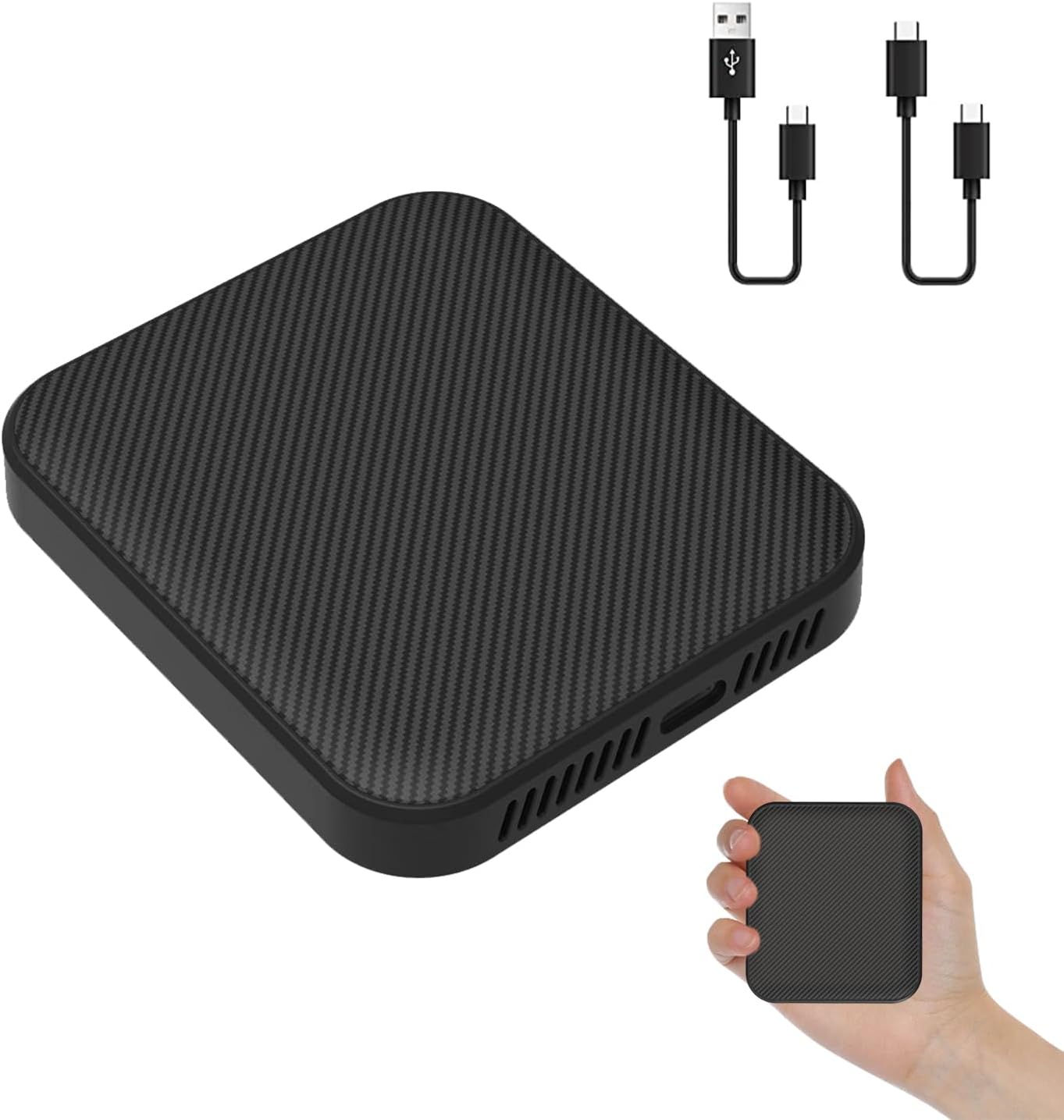
Description:
Details:
| Brand | HMYC |
|---|---|
| Connectivity Technology | Wireless |
| Connector Type | USB Type C |
| Special Feature | Auto re connection |
| Resolution | 1080p |
| Controller Type | Touch Control |
| Color | Black |
| Model Name | SMT-9B |
| Item Weight | 0.09 kg |
| Compatible Devices | iPhone & Android Phones |
Visit the HMYC Store
HMYC 2024 Wireless CarPlay & Android Auto Dongle, 5.8GHz WiFi/BT5.0, Auto-Connect, OTA Update
 Imported From: United States
At BOLO, we work hard to ensure the products you receive are new, genuine, and sourced from reputable suppliers.
Every product in the BOLO catalogue is sourced through our Verified Global Supply Network of verified sellers, authorized distributors or directly from the manufacturer.
Each product undergoes thorough inspection and verification at our consolidation and fulfilment centers to ensure it meets our strict authenticity and quality standards before being shipped and delivered to you.
If you ever have concerns regarding the authenticity of a product purchased from us, please contact Bolo Support. We will review your inquiry promptly and, if necessary, provide documentation verifying authenticity or offer a suitable resolution.
Your trust is our top priority, and we are committed to maintaining transparency and integrity in every transaction.
While we strive to display accurate information, variations in packaging, labeling, instructions, or formulation may occasionally occur due to regional differences or supplier updates. For detailed or manufacturer-specific information, please contact the brand directly or reach out to BOLO Support for assistance.
Unless otherwise stated, all prices displayed on the product page include applicable taxes and import duties.
BOLO operates in accordance with the laws and regulations of Qatar. Any items found to be restricted or prohibited for sale within the Qatar will be cancelled prior to shipment. We take proactive measures to ensure that only products permitted for sale in Qatar are listed on our website.
All items are shipped by air, and any products classified as “Dangerous Goods (DG)” under IATA regulations will be removed from the order and cancelled.
All orders are processed manually, and we make every effort to process them promptly once confirmed. Products cancelled due to the above reasons will be permanently removed from listings across the website.

Say Goodbye to Tedious Cables!
HMYC Wireless CarPlay & Android Auto Adapter is designed for easy plug-and-play installation. Simply connect it to your car’s center console in just 3 seconds without the need for disassembly. It maintains the original car screen and runs smoothly, ensuring compatibility with the original car sound quality.
- Supports Both Wireless CarPlay & Wireless Android Auto
- Supports Original Car Controls: It supports all control modes of the original car, such as Siri voice assistant, steering wheel control, OEM knob, and touch screen control.
- Just Plug and Play: Plug and play design without dismantling the original car stereo, is suitable for car models with factory-wired CarPlay and Android Auto.
- Automatic connection: After first pairing, it will automatically recognize your phone and reconnect within a certain distance, even if your phone is in your pocket or backpack.
- Universal Compatibility: It's suitable for 98% of car models on the market equipped with factory CarPlay and Android Auto.

Great innovation! Great innovation! Great innovation!
HMYC 2-in-1 Wireless CarPlay & Android Auto Adapter
Are you still in trouble for choosing the right adapter model? This adapter provides you with a perfect solution. This wireless adapter is not only for CarPlay but also for Android Auto. It can quickly convert wired CarPlay to wireless CarPlay, wired Android Auto to wireless Android Auto. Plugging in your iPhone to use CarPlay is no longer required. The built-in 5Ghz WiFi module can quickly identify your phone.
WIRELESS APPLE CARPLAY - The Carplay wireless dongle supports Siri, GPS navigation, music app, phone calls, messages, original car control methods such as steering wheel control, touch screen control and knob operation. This wireless CarPlay adapter is suitable for iPhone with iOS 10 and above.
WIRELESS ANDROID AUTO - The android auto wireless dongle supports GPS navigation, Google Assistant, music playback, phone calls and original car operations. This wireless Android Auto dongle works with Android phones runs Android 11.0 and above.

Support Original Car Control, Upgrade Non-Destructively
OEM knobs control
Original car siri voice assistant control
Original car Touch screen control
Original car Steering wheel control

Instructions for use---How to Connect
Step1:TURN ON WIFI 8 BLUETOOTH
Turn on the iPhone's Bluetooth.WIFl, hotspot,and vehicleCarPlay function
Step2:CONNECT USB DONGLE
Connect the SMT-9B to the Car USB port , the blue light will light up and Bluetooth signal will appear on the car screen
Step3:PAIR CARPLAY VIA BLUETOOTH
Search and pair "smartBox-xxxx" for Bluetooth signals on your iPhone and allow all connection notifications
NOTE: Please search for Bluetooth "smartBox-***" on mobile phone after connecting to car's USB interface


Stable/Fast Connection, Auto Connect
Equipped with built-in upgade Bluetooth 5.0 and 5GHz WIFI modules, the CarPlay wireless adapter quickly recognizes your phone and transfers information. Ensure stable connection and provide a safe and stable driving environment.
After connecting for the first time, our wireless carplay adapter will automatically activate the wireless connection every time the car starts.

Compatible with 98% Car Model
The CarPlay wireless adapter compatible with cars that have factory wired CarPlay, support vehicles from 2017 and newer models. wireless carplay adapter unit perfectly fits for cars such as AUDI/ Toyota / BENZ / HONDA / Nissan /Porsche / VOLKSWAGEN / LEXUS, etc.
NOTE: Not compatible with specific models: BMW, Tesla, 2019 Toyota RAV4, Honda CRV.
For German cars like Volkswagen, Skoda, etc., when connecting wireless Android Auto for the first time, it is essential to manually tap the Android Auto icon on the car's infotainment system. For certain Honda models, a maximum of 5 devices can be connected. If there are more than 5 devices already connected, it will result in a connection failure. In such cases, you need to go to the system settings and delete other connected devices.
1.What should I do if the connection fails?
Before connecting, please disconnect the Bluetooth and WiFi of other devices on the mobile phone. Please ignore the Bluetooth name of this product and keep Bluetooth is turned off for 5 seconds, then reconnect to Bluetooth or unplug the Adapter and try again.
2.Unable to automatically reconnect?
In some cars, we need to select "automatic connection" in the CarPlay settings.
Other cases:
A. Please make sure that the Bluetooth and WiFi functions of your mobile phone are turned on and the Bluetooth is not occupied when you get in the car;
B. Clear the pairing record, restart the phone and re-pair the adapter.
3. Can the adapter be paired with multiple phones?
The adapter can be paired with multiple phones, but only one device can be connected at a time. Please note, by Bluetooth function default, the adapter's system will only auto-connect back to the last used phone.
More from this brand
Similar items from “In-Dash Navigation”
Share with
Or share with link
https://www.bolo.qa/products/UO0PE7C7Z13
Visit the HMYC Store
HMYC 2024 Wireless CarPlay & Android Auto Dongle, 5.8GHz WiFi/BT5.0, Auto-Connect, OTA Update
Imported From: United States
At BOLO, we work hard to ensure the products you receive are new, genuine, and sourced from reputable suppliers.
Every product in the BOLO catalogue is sourced through our Verified Global Supply Network of verified sellers, authorized distributors or directly from the manufacturer.
Each product undergoes thorough inspection and verification at our consolidation and fulfilment centers to ensure it meets our strict authenticity and quality standards before being shipped and delivered to you.
If you ever have concerns regarding the authenticity of a product purchased from us, please contact Bolo Support. We will review your inquiry promptly and, if necessary, provide documentation verifying authenticity or offer a suitable resolution.
Your trust is our top priority, and we are committed to maintaining transparency and integrity in every transaction.
While we strive to display accurate information, variations in packaging, labeling, instructions, or formulation may occasionally occur due to regional differences or supplier updates. For detailed or manufacturer-specific information, please contact the brand directly or reach out to BOLO Support for assistance.
Unless otherwise stated, all prices displayed on the product page include applicable taxes and import duties.
BOLO operates in accordance with the laws and regulations of Qatar. Any items found to be restricted or prohibited for sale within the Qatar will be cancelled prior to shipment. We take proactive measures to ensure that only products permitted for sale in Qatar are listed on our website.
All items are shipped by air, and any products classified as “Dangerous Goods (DG)” under IATA regulations will be removed from the order and cancelled.
All orders are processed manually, and we make every effort to process them promptly once confirmed. Products cancelled due to the above reasons will be permanently removed from listings across the website.
Description:
Details:
| Brand | HMYC |
|---|---|
| Connectivity Technology | Wireless |
| Connector Type | USB Type C |
| Special Feature | Auto re connection |
| Resolution | 1080p |
| Controller Type | Touch Control |
| Color | Black |
| Model Name | SMT-9B |
| Item Weight | 0.09 kg |
| Compatible Devices | iPhone & Android Phones |
Say Goodbye to Tedious Cables!
HMYC Wireless CarPlay & Android Auto Adapter is designed for easy plug-and-play installation. Simply connect it to your car’s center console in just 3 seconds without the need for disassembly. It maintains the original car screen and runs smoothly, ensuring compatibility with the original car sound quality.
- Supports Both Wireless CarPlay & Wireless Android Auto
- Supports Original Car Controls: It supports all control modes of the original car, such as Siri voice assistant, steering wheel control, OEM knob, and touch screen control.
- Just Plug and Play: Plug and play design without dismantling the original car stereo, is suitable for car models with factory-wired CarPlay and Android Auto.
- Automatic connection: After first pairing, it will automatically recognize your phone and reconnect within a certain distance, even if your phone is in your pocket or backpack.
- Universal Compatibility: It's suitable for 98% of car models on the market equipped with factory CarPlay and Android Auto.
Great innovation! Great innovation! Great innovation!
HMYC 2-in-1 Wireless CarPlay & Android Auto Adapter
Are you still in trouble for choosing the right adapter model? This adapter provides you with a perfect solution. This wireless adapter is not only for CarPlay but also for Android Auto. It can quickly convert wired CarPlay to wireless CarPlay, wired Android Auto to wireless Android Auto. Plugging in your iPhone to use CarPlay is no longer required. The built-in 5Ghz WiFi module can quickly identify your phone.
WIRELESS APPLE CARPLAY - The Carplay wireless dongle supports Siri, GPS navigation, music app, phone calls, messages, original car control methods such as steering wheel control, touch screen control and knob operation. This wireless CarPlay adapter is suitable for iPhone with iOS 10 and above.
WIRELESS ANDROID AUTO - The android auto wireless dongle supports GPS navigation, Google Assistant, music playback, phone calls and original car operations. This wireless Android Auto dongle works with Android phones runs Android 11.0 and above.
Support Original Car Control, Upgrade Non-Destructively
OEM knobs control
Original car siri voice assistant control
Original car Touch screen control
Original car Steering wheel control
Instructions for use---How to Connect
Step1:TURN ON WIFI 8 BLUETOOTH
Turn on the iPhone's Bluetooth.WIFl, hotspot,and vehicleCarPlay function
Step2:CONNECT USB DONGLE
Connect the SMT-9B to the Car USB port , the blue light will light up and Bluetooth signal will appear on the car screen
Step3:PAIR CARPLAY VIA BLUETOOTH
Search and pair "smartBox-xxxx" for Bluetooth signals on your iPhone and allow all connection notifications
NOTE: Please search for Bluetooth "smartBox-***" on mobile phone after connecting to car's USB interface
Stable/Fast Connection, Auto Connect
Equipped with built-in upgade Bluetooth 5.0 and 5GHz WIFI modules, the CarPlay wireless adapter quickly recognizes your phone and transfers information. Ensure stable connection and provide a safe and stable driving environment.
After connecting for the first time, our wireless carplay adapter will automatically activate the wireless connection every time the car starts.
Compatible with 98% Car Model
The CarPlay wireless adapter compatible with cars that have factory wired CarPlay, support vehicles from 2017 and newer models. wireless carplay adapter unit perfectly fits for cars such as AUDI/ Toyota / BENZ / HONDA / Nissan /Porsche / VOLKSWAGEN / LEXUS, etc.
NOTE: Not compatible with specific models: BMW, Tesla, 2019 Toyota RAV4, Honda CRV.
For German cars like Volkswagen, Skoda, etc., when connecting wireless Android Auto for the first time, it is essential to manually tap the Android Auto icon on the car's infotainment system. For certain Honda models, a maximum of 5 devices can be connected. If there are more than 5 devices already connected, it will result in a connection failure. In such cases, you need to go to the system settings and delete other connected devices.
1.What should I do if the connection fails?
Before connecting, please disconnect the Bluetooth and WiFi of other devices on the mobile phone. Please ignore the Bluetooth name of this product and keep Bluetooth is turned off for 5 seconds, then reconnect to Bluetooth or unplug the Adapter and try again.
2.Unable to automatically reconnect?
In some cars, we need to select "automatic connection" in the CarPlay settings.
Other cases:
A. Please make sure that the Bluetooth and WiFi functions of your mobile phone are turned on and the Bluetooth is not occupied when you get in the car;
B. Clear the pairing record, restart the phone and re-pair the adapter.
3. Can the adapter be paired with multiple phones?
The adapter can be paired with multiple phones, but only one device can be connected at a time. Please note, by Bluetooth function default, the adapter's system will only auto-connect back to the last used phone.
More from this brand
Similar items from “In-Dash Navigation”
Share with
Or share with link
https://www.bolo.qa/products/UO0PE7C7Z13