Deliver toQatar
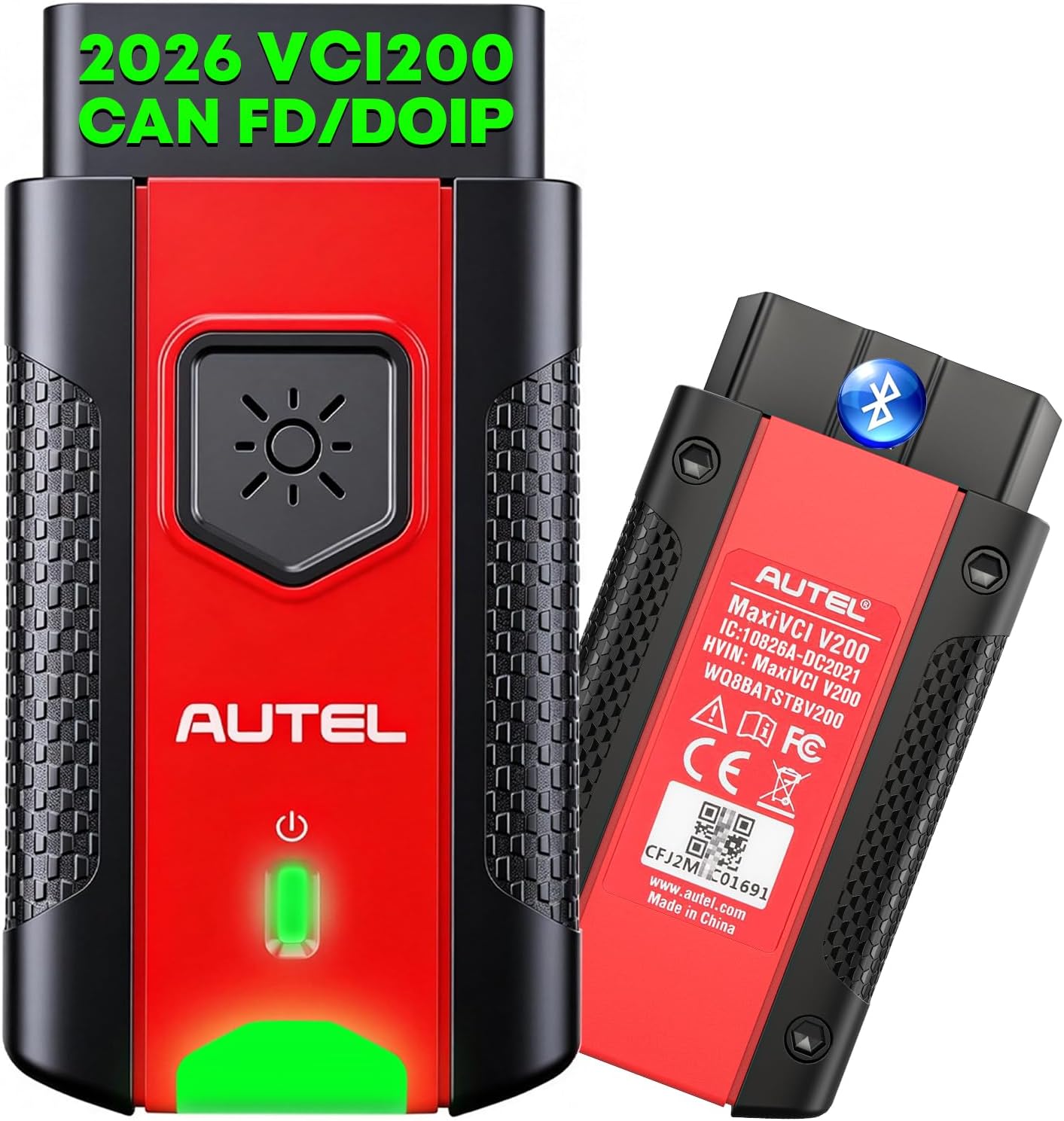
Autel MaxiVCI VCI200 V200 Wireless Dongle, VCI 200 OBD2 Connector Adapter

Description:

  • 👍【2026 Autel V200, Enhanced Upgrade from V150/ V100】Five Advantages of the Autel VCI 200: 1) It features built-in CAN-FD & DoIP protocols to scan 2026 and newer vehicles without requiring extra adapters. 2)164 feet Wireless diagnostic range-far superior to V100 33ft range—eliminating cable constraints. 3) Dual Bluetooth & USB connections, plug and play. 4) Compatible with most Autel diagnostic scanners. 5) 1-year warranty and lifetime service.
  • 👍【Support 95% Autel Scanners】2026 Autel latest VCI (Vehicle Communication Interface) supports Below Autel Scanners. ✅900 Series: MaxiCOM MK900BT, MK900-TS, MP900-BT, MP900BT Kit. ✅906 Series: MaxiSys MS906 Pro, MS906 MAX, MS906 Pro-TS, MK906 Pro, MK906S Pro, MK906 Pro-TS, MK906S Pro-TS, MK906 Pro2-TS. ✅IM Series: KM100, KM100X, KM100E. ✅MaxiBAS Models: BT608, BT609, ITS600. ✅Intelligent Series: Elite II PRO, MS909, Ultra Lite, Ultra. Autel MaxiVCI V200 supports DoIP and CAN FD protocols, covering more models.
  • 👍【CAN-FD & DoIP Compliant】No expensive CAN-FD & DoIP adapters needed; MaxiVCI V200 is equipped with CAN-FD and DoIP to diagnose the latest 2026 and newer vehicles unavailable to other tools. Its data transfer rate is up to 5Mbit/s to speed up scanning all vehicle systems, saving more time for technicians and garages. Autel MaxiVCI V200 also supports CAN, EOBD, OBD, OBDII interfaces to cover more cars both old and new.
  • 👍【Max 164ft. Wireless Blu.To.oth Connection】This Autel V200 VCI Bluet-ooth Doogle saves you from having to curl up at the steering wheel with tedious wires to repair your car, allowing you to repair the car freely around the car in 164 Feet. The ultra-fast Autel V 200 OBDII port can quickly transfer vehicle data to the scanner for accurate diagnostic results. More stable and fast with wireless Technology, saving time and win more business.
  • 👍【How to Pair V200, Plug & Play】Easy 3 Steps to connect vehicle and scanner: 1. Insert the Vehicle Data Connector on the MaxiVCl V200 into the vehicle's DLC; 2. Power up the scanner; 3. Pair the scanner with the MaxiVCl V200 to establish communication. In addition, you can also plug the USB cable into the VCI200 to establish communication, and the system will give priority to USB communication. Both connection methods are simple and easy to understand.
  • 👍【NON-OBDII & OBD II Vehicle Connect Way】If your car with Non-OBDII port, you require OBDI adapter to complete connect: First locate the required OBDI adapter and connect its 16-pi-n jack to the Vehicle Data Connector on the MaxiVCI V200, then Connect the attached OBDI adapter to the vehicle’s DLC. If your vehicle is standard OBD II port, only Insert V200 into DLC, which is generally located under the vehicle dash.
  • 💝【Lifetime Fre-e Upgrades】Autel MaxiVCI V200 has continuous function updates to improve performance and help you avoid extra costs for new hardware. Simple upgrade steps: power on your Autel scanner, connect it to the V200 via Bluetooth or USB, open “VCI Manager”→ choose “VCI Update”→tap “Update Now”→ reconnect the V200. Autel MaxiVCI V200 VCI200 Interface comes with 1 year warranty, 30 days no reason return and replacement policy. Any connection/ update issues, please reach out to us via 🚘auteldirect @ outlook. com🚘. Note: Turn off the vehicle ignition before plugging or unplugging the VCI to prevent current surge damage.
  •  

    What's in the box

  • Autel MaxiVCI V200
  • Details:

    BrandAutel
    Power SourceCorded Electric
    Operating SystemWindows XP
    Screen Size1 inches
    Item Highlight2026 2.0 of V150 VCI100 V100 Car Communication Interface, for MK900BT MP900BT MS906 PRO MS906MAX MS906 PRO-TS KM100 BT608 etc

    Autel MaxiVCI VCI200 V200 Wireless Dongle, VCI 200 OBD2 Connector Adapter

    Product ID: UO0OOSL2848
    Condition: New

    QAR2,17296

    Price includes VAT & Import Duties
    Availability: In Stock

    Quantity:

    |

    Order today to get by 7-14 business days

    This item qualifies for free delivery

    Returns & Warranty policies

    Imported From: United States

    At BOLO, we work hard to ensure the products you receive are new, genuine, and sourced from reputable suppliers.

    Every product in the BOLO catalogue is sourced through our Verified Global Supply Network of verified sellers, authorized distributors or directly from the manufacturer.

    Each product undergoes thorough inspection and verification at our consolidation and fulfilment centers to ensure it meets our strict authenticity and quality standards before being shipped and delivered to you.

    If you ever have concerns regarding the authenticity of a product purchased from us, please contact Bolo Support. We will review your inquiry promptly and, if necessary, provide documentation verifying authenticity or offer a suitable resolution.

    Your trust is our top priority, and we are committed to maintaining transparency and integrity in every transaction.

    While we strive to display accurate information, variations in packaging, labeling, instructions, or formulation may occasionally occur due to regional differences or supplier updates. For detailed or manufacturer-specific information, please contact the brand directly or reach out to BOLO Support for assistance.

    Unless otherwise stated, all prices displayed on the product page include applicable taxes and import duties.

    BOLO operates in accordance with the laws and regulations of Qatar. Any items found to be restricted or prohibited for sale within the Qatar will be cancelled prior to shipment. We take proactive measures to ensure that only products permitted for sale in Qatar are listed on our website.

    All items are shipped by air, and any products classified as “Dangerous Goods (DG)” under IATA regulations will be removed from the order and cancelled.

    All orders are processed manually, and we make every effort to process them promptly once confirmed. Products cancelled due to the above reasons will be permanently removed from listings across the website.

    Autel MaxiVCI V200 OBD OBD II Wireless Connector

    Product details by manufacturer

    Plug and Play, in Just 3 Steps

    Product details by manufacturer

    Work with Autel New Scanners

    Product details by manufacturer

    Support DOIP & CAN FD Protocols

    Product details by manufacturer

    Autel VCI V200 Wireless Connector LED Description

    Product details by manufacturer
    Product details by manufacturer

    Solid Green

    When Vehicle/Connection LED is solid green, the VCI is connected via USB cable.

    Product details by manufacturer

    Flashing Green

    When Vehicle/Connection LED is flashing green, the VCl is communicating via USB cable.

    Product details by manufacturer

    Solid Blue

    When Vehicle/Connection LED is solid blue, the VCI is connected via Wireless.

    Product details by manufacturer

    Flashing Blue

    When Vehicle/Connection LED is flashing blue, the VCI is communicating via Wireless.

    More from this brand

    Similar items from “Code Readers & Scan Tools”

    Autel MaxiVCI VCI200 V200 Wireless Dongle, VCI 200 OBD2 Connector Adapter

    Product ID: UO0OOSL2848
    Condition: New
    Autel MaxiVCI VCI200 V200 Wireless Dongle, VCI 200 OBD2 Connector Adapter-0

    QAR2,17296

    Price includes VAT & Import Duties
    Availability: In Stock

    Quantity:

    |

    Order today to get by 7-14 business days

    This item qualifies for free delivery

    Returns & Warranty policies

    Imported From: United States

    At BOLO, we work hard to ensure the products you receive are new, genuine, and sourced from reputable suppliers.

    Every product in the BOLO catalogue is sourced through our Verified Global Supply Network of verified sellers, authorized distributors or directly from the manufacturer.

    Each product undergoes thorough inspection and verification at our consolidation and fulfilment centers to ensure it meets our strict authenticity and quality standards before being shipped and delivered to you.

    If you ever have concerns regarding the authenticity of a product purchased from us, please contact Bolo Support. We will review your inquiry promptly and, if necessary, provide documentation verifying authenticity or offer a suitable resolution.

    Your trust is our top priority, and we are committed to maintaining transparency and integrity in every transaction.

    While we strive to display accurate information, variations in packaging, labeling, instructions, or formulation may occasionally occur due to regional differences or supplier updates. For detailed or manufacturer-specific information, please contact the brand directly or reach out to BOLO Support for assistance.

    Unless otherwise stated, all prices displayed on the product page include applicable taxes and import duties.

    BOLO operates in accordance with the laws and regulations of Qatar. Any items found to be restricted or prohibited for sale within the Qatar will be cancelled prior to shipment. We take proactive measures to ensure that only products permitted for sale in Qatar are listed on our website.

    All items are shipped by air, and any products classified as “Dangerous Goods (DG)” under IATA regulations will be removed from the order and cancelled.

    All orders are processed manually, and we make every effort to process them promptly once confirmed. Products cancelled due to the above reasons will be permanently removed from listings across the website.

    Description:

  • 👍【2026 Autel V200, Enhanced Upgrade from V150/ V100】Five Advantages of the Autel VCI 200: 1) It features built-in CAN-FD & DoIP protocols to scan 2026 and newer vehicles without requiring extra adapters. 2)164 feet Wireless diagnostic range-far superior to V100 33ft range—eliminating cable constraints. 3) Dual Bluetooth & USB connections, plug and play. 4) Compatible with most Autel diagnostic scanners. 5) 1-year warranty and lifetime service.
  • 👍【Support 95% Autel Scanners】2026 Autel latest VCI (Vehicle Communication Interface) supports Below Autel Scanners. ✅900 Series: MaxiCOM MK900BT, MK900-TS, MP900-BT, MP900BT Kit. ✅906 Series: MaxiSys MS906 Pro, MS906 MAX, MS906 Pro-TS, MK906 Pro, MK906S Pro, MK906 Pro-TS, MK906S Pro-TS, MK906 Pro2-TS. ✅IM Series: KM100, KM100X, KM100E. ✅MaxiBAS Models: BT608, BT609, ITS600. ✅Intelligent Series: Elite II PRO, MS909, Ultra Lite, Ultra. Autel MaxiVCI V200 supports DoIP and CAN FD protocols, covering more models.
  • 👍【CAN-FD & DoIP Compliant】No expensive CAN-FD & DoIP adapters needed; MaxiVCI V200 is equipped with CAN-FD and DoIP to diagnose the latest 2026 and newer vehicles unavailable to other tools. Its data transfer rate is up to 5Mbit/s to speed up scanning all vehicle systems, saving more time for technicians and garages. Autel MaxiVCI V200 also supports CAN, EOBD, OBD, OBDII interfaces to cover more cars both old and new.
  • 👍【Max 164ft. Wireless Blu.To.oth Connection】This Autel V200 VCI Bluet-ooth Doogle saves you from having to curl up at the steering wheel with tedious wires to repair your car, allowing you to repair the car freely around the car in 164 Feet. The ultra-fast Autel V 200 OBDII port can quickly transfer vehicle data to the scanner for accurate diagnostic results. More stable and fast with wireless Technology, saving time and win more business.
  • 👍【How to Pair V200, Plug & Play】Easy 3 Steps to connect vehicle and scanner: 1. Insert the Vehicle Data Connector on the MaxiVCl V200 into the vehicle's DLC; 2. Power up the scanner; 3. Pair the scanner with the MaxiVCl V200 to establish communication. In addition, you can also plug the USB cable into the VCI200 to establish communication, and the system will give priority to USB communication. Both connection methods are simple and easy to understand.
  • 👍【NON-OBDII & OBD II Vehicle Connect Way】If your car with Non-OBDII port, you require OBDI adapter to complete connect: First locate the required OBDI adapter and connect its 16-pi-n jack to the Vehicle Data Connector on the MaxiVCI V200, then Connect the attached OBDI adapter to the vehicle’s DLC. If your vehicle is standard OBD II port, only Insert V200 into DLC, which is generally located under the vehicle dash.
  • 💝【Lifetime Fre-e Upgrades】Autel MaxiVCI V200 has continuous function updates to improve performance and help you avoid extra costs for new hardware. Simple upgrade steps: power on your Autel scanner, connect it to the V200 via Bluetooth or USB, open “VCI Manager”→ choose “VCI Update”→tap “Update Now”→ reconnect the V200. Autel MaxiVCI V200 VCI200 Interface comes with 1 year warranty, 30 days no reason return and replacement policy. Any connection/ update issues, please reach out to us via 🚘auteldirect @ outlook. com🚘. Note: Turn off the vehicle ignition before plugging or unplugging the VCI to prevent current surge damage.
  •  

    What's in the box

  • Autel MaxiVCI V200
  • Details:

    BrandAutel
    Power SourceCorded Electric
    Operating SystemWindows XP
    Screen Size1 inches
    Item Highlight2026 2.0 of V150 VCI100 V100 Car Communication Interface, for MK900BT MP900BT MS906 PRO MS906MAX MS906 PRO-TS KM100 BT608 etc

    Autel MaxiVCI V200 OBD OBD II Wireless Connector

    Product details by manufacturer

    Plug and Play, in Just 3 Steps

    Product details by manufacturer

    Work with Autel New Scanners

    Product details by manufacturer

    Support DOIP & CAN FD Protocols

    Product details by manufacturer

    Autel VCI V200 Wireless Connector LED Description

    Product details by manufacturer
    Product details by manufacturer

    Solid Green

    When Vehicle/Connection LED is solid green, the VCI is connected via USB cable.

    Product details by manufacturer

    Flashing Green

    When Vehicle/Connection LED is flashing green, the VCl is communicating via USB cable.

    Product details by manufacturer

    Solid Blue

    When Vehicle/Connection LED is solid blue, the VCI is connected via Wireless.

    Product details by manufacturer

    Flashing Blue

    When Vehicle/Connection LED is flashing blue, the VCI is communicating via Wireless.

    More from this brand

    Similar items from “Code Readers & Scan Tools”