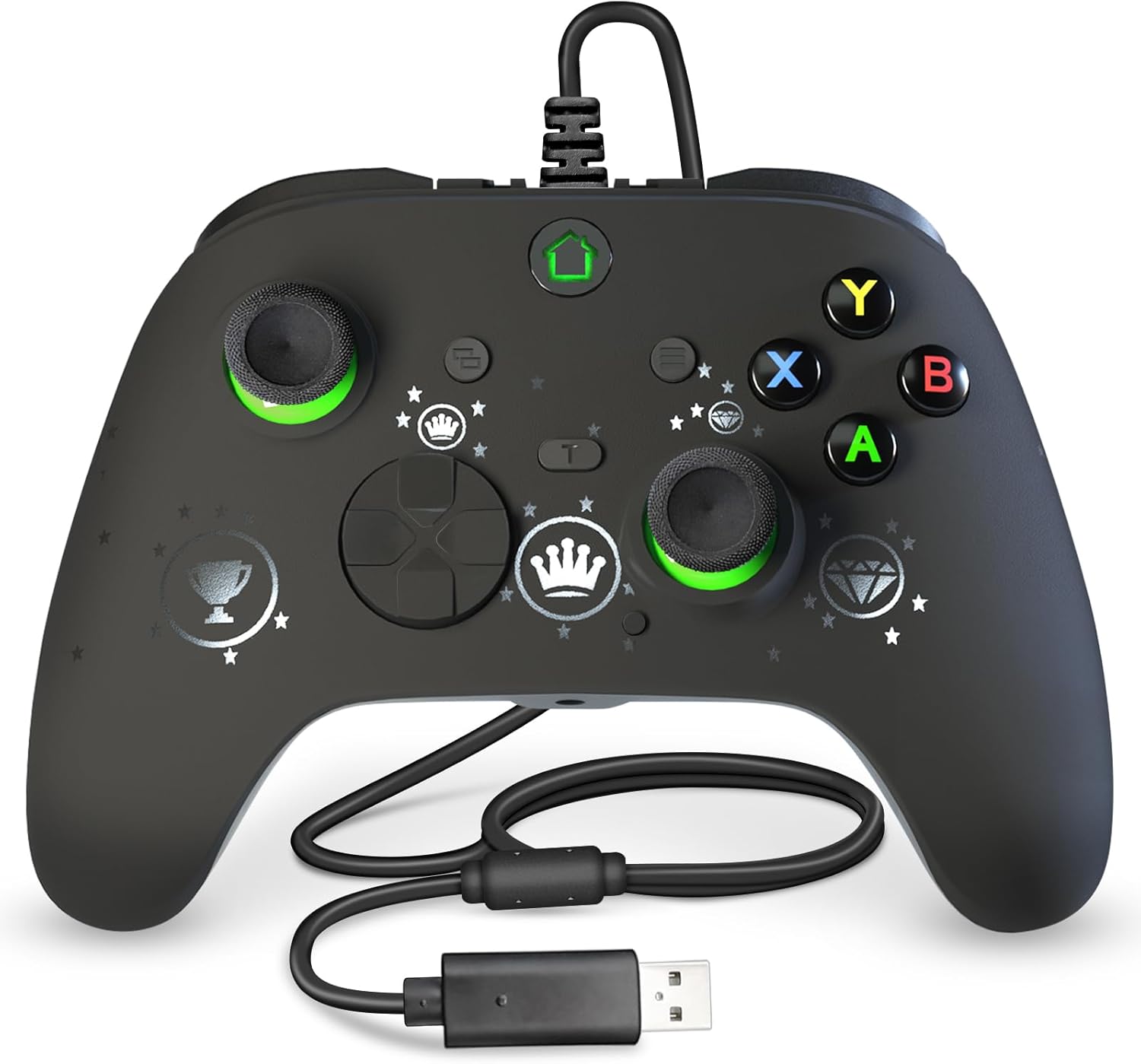
Description:
Details:
| Brand | falafaso |
|---|---|
| Compatible devices | PC |
| Controller type | Gamepad |
| Connectivity technology | USB |
| Colour | Black |
Visit the falafaso Store
Controller PC, Wired USB Gaming Controller for PC 10 and Steam Platforms, Game Joystick with Dual-Vibration, Turbo, Programmable, RGB LED Light and 3.5mm Stereoscopic Jack
'%3e%3crect%20x='0.599609'%20width='22.4'%20height='16'%20fill='%230A17A7'/%3e%3cpath%20fill-rule='evenodd'%20clip-rule='evenodd'%20d='M-0.426196%20-1.53223L9.1335%204.91587V-1.06506H14.4668V4.91648L24.0263%20-1.53147L25.2193%200.237148L17.6615%205.33494H23.0002V10.6683H17.6618L25.2187%2015.7655L24.0258%2017.5341L14.4668%2011.0865V17.0683H9.1335V11.0871L-0.425634%2017.5348L-1.61858%2015.7662L5.93947%2010.6683H0.600172V5.33494H5.93977L-1.61914%200.236387L-0.426196%20-1.53223Z'%20fill='white'/%3e%3cpath%20d='M15.5332%205.06615L25.6655%20-1.59961'%20stroke='%23DB1F35'%20stroke-width='0.533333'%20stroke-linecap='round'/%3e%3cpath%20d='M16.6094%2010.9578L25.6924%2017.0801'%20stroke='%23DB1F35'%20stroke-width='0.533333'%20stroke-linecap='round'/%3e%3cpath%20d='M7.00176%205.04727L-2.47266%20-1.33789'%20stroke='%23DB1F35'%20stroke-width='0.533333'%20stroke-linecap='round'/%3e%3cpath%20d='M8.02936%2010.8842L-2.47266%2017.8486'%20stroke='%23DB1F35'%20stroke-width='0.533333'%20stroke-linecap='round'/%3e%3cpath%20fill-rule='evenodd'%20clip-rule='evenodd'%20d='M0.599609%209.6H10.1996V16H13.3996V9.6H22.9996V6.4H13.3996V0H10.1996V6.4H0.599609V9.6Z'%20fill='%23E6273E'/%3e%3c/g%3e%3c/svg%3e) Imported From: United Kingdom
Imported From: United Kingdom
At BOLO, we work hard to ensure the products you receive are new, genuine, and sourced from reputable suppliers.
Every product in the BOLO catalogue is sourced through our Verified Global Supply Network of verified sellers, authorized distributors or directly from the manufacturer.
Each product undergoes thorough inspection and verification at our consolidation and fulfilment centers to ensure it meets our strict authenticity and quality standards before being shipped and delivered to you.
If you ever have concerns regarding the authenticity of a product purchased from us, please contact Bolo Support. We will review your inquiry promptly and, if necessary, provide documentation verifying authenticity or offer a suitable resolution.
Your trust is our top priority, and we are committed to maintaining transparency and integrity in every transaction.
While we strive to display accurate information, variations in packaging, labeling, instructions, or formulation may occasionally occur due to regional differences or supplier updates. For detailed or manufacturer-specific information, please contact the brand directly or reach out to BOLO Support for assistance.
Unless otherwise stated, all prices displayed on the product page include applicable taxes and import duties.
BOLO operates in accordance with the laws and regulations of Qatar. Any items found to be restricted or prohibited for sale within the Qatar will be cancelled prior to shipment. We take proactive measures to ensure that only products permitted for sale in Qatar are listed on our website.
All items are shipped by air, and any products classified as “Dangerous Goods (DG)” under IATA regulations will be removed from the order and cancelled.
All orders are processed manually, and we make every effort to process them promptly once confirmed. Products cancelled due to the above reasons will be permanently removed from listings across the website.


Note:
This is a third party grip, not original. On the xbox series of consoles you may have problems with pop-ups and such.
If you are experiencing pop-up incompatibility issues, please refer to the below guidelines to upgrade by yourself.
Upgrade files download link search: hansengame.com/Service/Download
Upgrade installation package name: Xbox controller upgrade files (For Sun,...)


TURBO Function:
- Set turbo function: Press and hold the turbo button and the function button you want to send continuously, you can realize the continuous function (eight times a second)
- Cancel turbo function: Press and hold the turbo button and you set the turbo function button, you can cancel
- Buttons that can be set are (UP, DOWN, LEFT, RIGHT, A, B, X, Y, LB, RB, LT, RT, L3, R3)

Programming functionality:
Note: Any connection mode, any mode, can support the mapping function
Action buttons: ABXY, LRZLZRL3R3
Programming Buttons: (PL/PR/SET)
The operation sample:
- Press and hold the set button for 3 seconds, at this time the back button enters the mapping mode, the mode light flashes, and then the button that is mapped on demand, such as L, the mode light flashes quickly, and then press the Pa button again (Pa= NL, NR), the indicator light returns to the channel light indication, pa to achieve L function
- After entering the mapping mode, no operation is performed, and after 7 seconds, the programming mode is exited, and the previous function is restored.
- Enter the mapping mode and press the Pa button, the Pa button is cleared. That is, NL and NR clear the mapped button-value function.
Similar suggestions by Bolo
More from this brand
Similar items from “Gamepads & Standard Controllers”
Share with
Or share with link
https://www.bolo.qa/products/KO0QTK3MG5T
Visit the falafaso Store
Controller PC, Wired USB Gaming Controller for PC 10 and Steam Platforms, Game Joystick with Dual-Vibration, Turbo, Programmable, RGB LED Light and 3.5mm Stereoscopic Jack
Imported From: United Kingdom
At BOLO, we work hard to ensure the products you receive are new, genuine, and sourced from reputable suppliers.
Every product in the BOLO catalogue is sourced through our Verified Global Supply Network of verified sellers, authorized distributors or directly from the manufacturer.
Each product undergoes thorough inspection and verification at our consolidation and fulfilment centers to ensure it meets our strict authenticity and quality standards before being shipped and delivered to you.
If you ever have concerns regarding the authenticity of a product purchased from us, please contact Bolo Support. We will review your inquiry promptly and, if necessary, provide documentation verifying authenticity or offer a suitable resolution.
Your trust is our top priority, and we are committed to maintaining transparency and integrity in every transaction.
While we strive to display accurate information, variations in packaging, labeling, instructions, or formulation may occasionally occur due to regional differences or supplier updates. For detailed or manufacturer-specific information, please contact the brand directly or reach out to BOLO Support for assistance.
Unless otherwise stated, all prices displayed on the product page include applicable taxes and import duties.
BOLO operates in accordance with the laws and regulations of Qatar. Any items found to be restricted or prohibited for sale within the Qatar will be cancelled prior to shipment. We take proactive measures to ensure that only products permitted for sale in Qatar are listed on our website.
All items are shipped by air, and any products classified as “Dangerous Goods (DG)” under IATA regulations will be removed from the order and cancelled.
All orders are processed manually, and we make every effort to process them promptly once confirmed. Products cancelled due to the above reasons will be permanently removed from listings across the website.
Description:
Details:
| Brand | falafaso |
|---|---|
| Compatible devices | PC |
| Controller type | Gamepad |
| Connectivity technology | USB |
| Colour | Black |
Note:
This is a third party grip, not original. On the xbox series of consoles you may have problems with pop-ups and such.
If you are experiencing pop-up incompatibility issues, please refer to the below guidelines to upgrade by yourself.
Upgrade files download link search: hansengame.com/Service/Download
Upgrade installation package name: Xbox controller upgrade files (For Sun,...)
TURBO Function:
- Set turbo function: Press and hold the turbo button and the function button you want to send continuously, you can realize the continuous function (eight times a second)
- Cancel turbo function: Press and hold the turbo button and you set the turbo function button, you can cancel
- Buttons that can be set are (UP, DOWN, LEFT, RIGHT, A, B, X, Y, LB, RB, LT, RT, L3, R3)
Programming functionality:
Note: Any connection mode, any mode, can support the mapping function
Action buttons: ABXY, LRZLZRL3R3
Programming Buttons: (PL/PR/SET)
The operation sample:
- Press and hold the set button for 3 seconds, at this time the back button enters the mapping mode, the mode light flashes, and then the button that is mapped on demand, such as L, the mode light flashes quickly, and then press the Pa button again (Pa= NL, NR), the indicator light returns to the channel light indication, pa to achieve L function
- After entering the mapping mode, no operation is performed, and after 7 seconds, the programming mode is exited, and the previous function is restored.
- Enter the mapping mode and press the Pa button, the Pa button is cleared. That is, NL and NR clear the mapped button-value function.
Similar suggestions by Bolo
More from this brand
Similar items from “Gamepads & Standard Controllers”
Share with
Or share with link
https://www.bolo.qa/products/KO0QTK3MG5T