Description:
What's in the box?
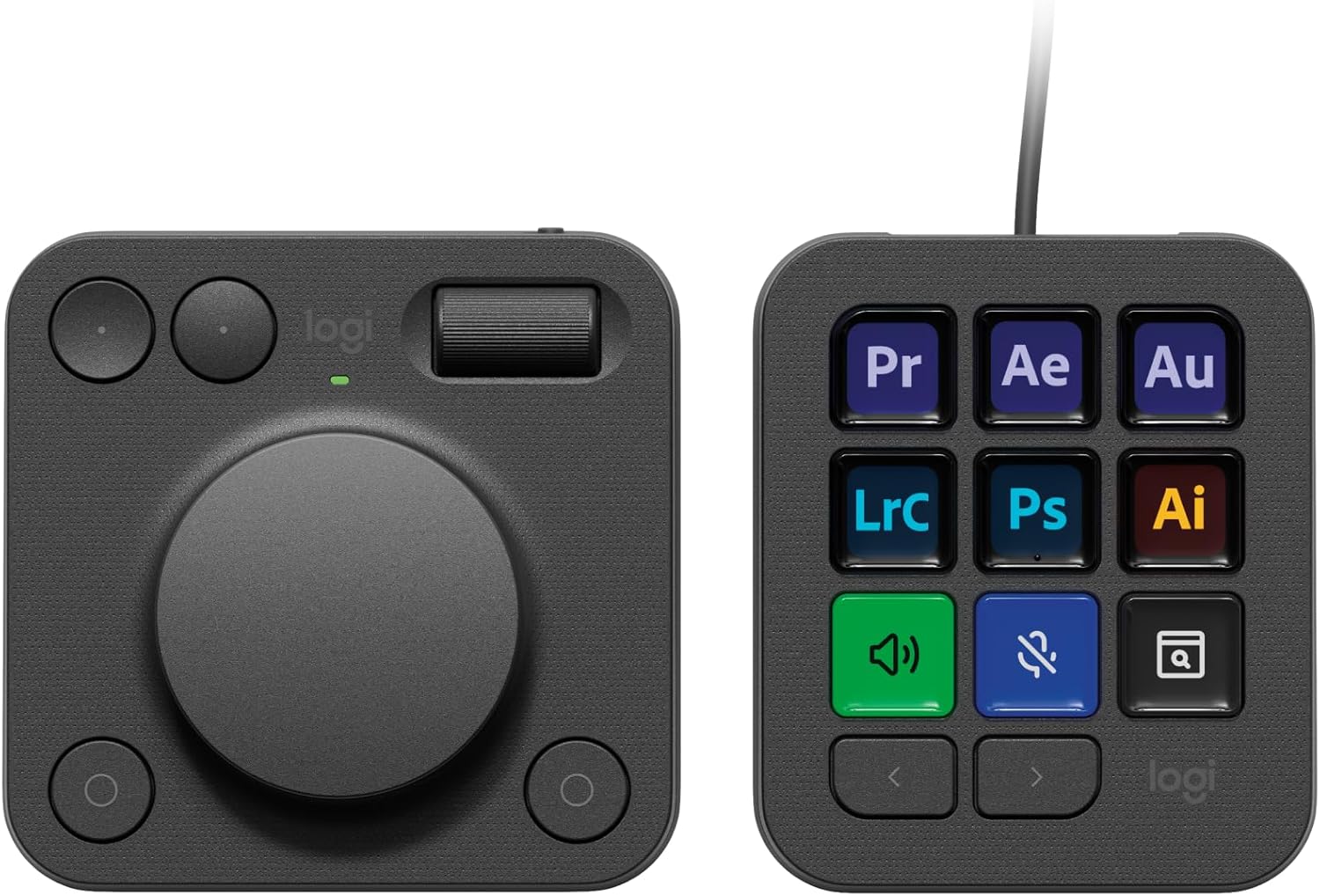
Streamline your creative workflow with the Logitech MX Creative Console, featuring a programmable keypad with 9 customisable LCD display keys and a contextual dial with tactile controls for precise adjustments. Quickly access all your favourite tools with visual feedback in full-colour keys and recommended profile configurations with the most relevant actions for each application so that you can get started right away. Experience native integration with Adobe Photoshop, Adobe Premiere Pro, Adobe Illustrator, Adobe Photoshop Lightroom Classic, Spotify, Zoom, and more (1). Assign actions and tools to up to 15 keypad pages by profile, dial, and roller. Create shortcuts and Smart Actions, and customise the console to your style by uploading your own icons. Premium tactile analog controls let you make precise adjustments with an aluminium low-friction dial, navigate with a smooth roller, and access shortcuts with customisable display keys. Find a growing library of free actions, plugins, profile templates, icon packs, and more through the marketplace in the Logi Options+ App (2). Plastic parts in the MX Creative Console include certified post-consumer recycled plastic (Graphite: 72%, Pale Grey: 55%) (4). (1)The purchase of an MX Creative Console includes 3 months Adobe Creative Cloud All Apps membership (2) Requires Logi Options+ app, available for recent versions of Windows and macOS (3) Battery life may vary based on user and computing conditions (4) Excludes printed wiring assembly (PWA), cables, membrane, LCD, EMI Gasket, and packaging.
Details:
Visit the Logitech Store
Logitech MX Creative Console, Programmable Keypad
QAR1,34740


Quantity:
Order today to get by 7-14 business days
This item qualifies for free delivery
'%3e%3crect%20x='0.599609'%20width='22.4'%20height='16'%20fill='%230A17A7'/%3e%3cpath%20fill-rule='evenodd'%20clip-rule='evenodd'%20d='M-0.426196%20-1.53223L9.1335%204.91587V-1.06506H14.4668V4.91648L24.0263%20-1.53147L25.2193%200.237148L17.6615%205.33494H23.0002V10.6683H17.6618L25.2187%2015.7655L24.0258%2017.5341L14.4668%2011.0865V17.0683H9.1335V11.0871L-0.425634%2017.5348L-1.61858%2015.7662L5.93947%2010.6683H0.600172V5.33494H5.93977L-1.61914%200.236387L-0.426196%20-1.53223Z'%20fill='white'/%3e%3cpath%20d='M15.5332%205.06615L25.6655%20-1.59961'%20stroke='%23DB1F35'%20stroke-width='0.533333'%20stroke-linecap='round'/%3e%3cpath%20d='M16.6094%2010.9578L25.6924%2017.0801'%20stroke='%23DB1F35'%20stroke-width='0.533333'%20stroke-linecap='round'/%3e%3cpath%20d='M7.00176%205.04727L-2.47266%20-1.33789'%20stroke='%23DB1F35'%20stroke-width='0.533333'%20stroke-linecap='round'/%3e%3cpath%20d='M8.02936%2010.8842L-2.47266%2017.8486'%20stroke='%23DB1F35'%20stroke-width='0.533333'%20stroke-linecap='round'/%3e%3cpath%20fill-rule='evenodd'%20clip-rule='evenodd'%20d='M0.599609%209.6H10.1996V16H13.3996V9.6H22.9996V6.4H13.3996V0H10.1996V6.4H0.599609V9.6Z'%20fill='%23E6273E'/%3e%3c/g%3e%3c/svg%3e) Imported From: United Kingdom
Imported From: United Kingdom
At BOLO, we work hard to ensure the products you receive are new, genuine, and sourced from reputable suppliers.
Every product in the BOLO catalogue is sourced through our Verified Global Supply Network of verified sellers, authorized distributors or directly from the manufacturer.
Each product undergoes thorough inspection and verification at our consolidation and fulfilment centers to ensure it meets our strict authenticity and quality standards before being shipped and delivered to you.
If you ever have concerns regarding the authenticity of a product purchased from us, please contact Bolo Support. We will review your inquiry promptly and, if necessary, provide documentation verifying authenticity or offer a suitable resolution.
Your trust is our top priority, and we are committed to maintaining transparency and integrity in every transaction.
While we strive to display accurate information, variations in packaging, labeling, instructions, or formulation may occasionally occur due to regional differences or supplier updates. For detailed or manufacturer-specific information, please contact the brand directly or reach out to BOLO Support for assistance.
Unless otherwise stated, all prices displayed on the product page include applicable taxes and import duties.
BOLO operates in accordance with the laws and regulations of Qatar. Any items found to be restricted or prohibited for sale within the Qatar will be cancelled prior to shipment. We take proactive measures to ensure that only products permitted for sale in Qatar are listed on our website.
All items are shipped by air, and any products classified as “Dangerous Goods (DG)” under IATA regulations will be removed from the order and cancelled.
All orders are processed manually, and we make every effort to process them promptly once confirmed. Products cancelled due to the above reasons will be permanently removed from listings across the website.

Customise your creative workflow
Customise your console to your favourite apps (1)on Logi Options+ App(2), or use recommended profiles, so you can start creating out of the box.

-
Craft your vision in Photoshop
Focus on fine-tuning details with precise adjustments on tactile controls, and quick access to your creative toolbox (1).
-
Expand creativity in Illustrator
Focus on the bigger picture and gain quick access to all your creative tools, from colour palettes and easy brush size adjustment (1).
-
Elevate your designs in Figma
Easily adjust layouts and manage assets. Align elements, tweak spacing, and modify text with precision in Figma.

-
Fine-tune in Lightroom
Use tactile controls to quickly navigate your Library, precisely adjust color and light, rotate and crop, apply presets, rate and flag images. (1).
-
Make Photoshop work your way
Customise your workflow, gain instant access to your tools and retouch portraits, compose, colour correct, and work on complex-layer projects with ease (1).

-
Trim down edit times on Premiere Pro
Navigate your timeline easily, arrange, cut, edit, and enhance your footage with advanced tools for colour grading, audio editing, and effects (1).
-
Faster Editing in Final Cut Pro
Fly through your timeline with quick access to editing tools like blade, nudge, trim, and delete, and fine-tune color grading with the color wheels.
-
Animate faster in Adobe After Effects
Creative keypad and dialpad lets you animate video, create 3D, and animate motion with more speed, precision, and control (1).
-
Tune to your flow in Adobe Audition
Easily record, mix, and edit to your vibe, with precise analog controls and countless customisations(1).

Endless customisations on Marketplace
Marketplace on Logi Options+ App (2) gives you access to hundreds of plugins, profile templates, icon packs, and more.

Your ultimate creative setup
Complete your MX setup for ultimate creative control with MX Master 3S advanced wireless mouse, MX Mechanical keyboard, and MX Brio UHD 4K webcam.
Similar suggestions by Bolo
More from this brand
Similar items from “Keyboards”
Share with
Or share with link
https://www.bolo.qa/products/KO0QQCMX8FI
Visit the Logitech Store
Logitech MX Creative Console, Programmable Keypad
QAR1,34740
Quantity:
Order today to get by 7-14 business days
This item qualifies for free delivery
Imported From: United Kingdom
At BOLO, we work hard to ensure the products you receive are new, genuine, and sourced from reputable suppliers.
Every product in the BOLO catalogue is sourced through our Verified Global Supply Network of verified sellers, authorized distributors or directly from the manufacturer.
Each product undergoes thorough inspection and verification at our consolidation and fulfilment centers to ensure it meets our strict authenticity and quality standards before being shipped and delivered to you.
If you ever have concerns regarding the authenticity of a product purchased from us, please contact Bolo Support. We will review your inquiry promptly and, if necessary, provide documentation verifying authenticity or offer a suitable resolution.
Your trust is our top priority, and we are committed to maintaining transparency and integrity in every transaction.
While we strive to display accurate information, variations in packaging, labeling, instructions, or formulation may occasionally occur due to regional differences or supplier updates. For detailed or manufacturer-specific information, please contact the brand directly or reach out to BOLO Support for assistance.
Unless otherwise stated, all prices displayed on the product page include applicable taxes and import duties.
BOLO operates in accordance with the laws and regulations of Qatar. Any items found to be restricted or prohibited for sale within the Qatar will be cancelled prior to shipment. We take proactive measures to ensure that only products permitted for sale in Qatar are listed on our website.
All items are shipped by air, and any products classified as “Dangerous Goods (DG)” under IATA regulations will be removed from the order and cancelled.
All orders are processed manually, and we make every effort to process them promptly once confirmed. Products cancelled due to the above reasons will be permanently removed from listings across the website.
Description:
What's in the box?
Streamline your creative workflow with the Logitech MX Creative Console, featuring a programmable keypad with 9 customisable LCD display keys and a contextual dial with tactile controls for precise adjustments. Quickly access all your favourite tools with visual feedback in full-colour keys and recommended profile configurations with the most relevant actions for each application so that you can get started right away. Experience native integration with Adobe Photoshop, Adobe Premiere Pro, Adobe Illustrator, Adobe Photoshop Lightroom Classic, Spotify, Zoom, and more (1). Assign actions and tools to up to 15 keypad pages by profile, dial, and roller. Create shortcuts and Smart Actions, and customise the console to your style by uploading your own icons. Premium tactile analog controls let you make precise adjustments with an aluminium low-friction dial, navigate with a smooth roller, and access shortcuts with customisable display keys. Find a growing library of free actions, plugins, profile templates, icon packs, and more through the marketplace in the Logi Options+ App (2). Plastic parts in the MX Creative Console include certified post-consumer recycled plastic (Graphite: 72%, Pale Grey: 55%) (4). (1)The purchase of an MX Creative Console includes 3 months Adobe Creative Cloud All Apps membership (2) Requires Logi Options+ app, available for recent versions of Windows and macOS (3) Battery life may vary based on user and computing conditions (4) Excludes printed wiring assembly (PWA), cables, membrane, LCD, EMI Gasket, and packaging.
Details:
Customise your creative workflow
Customise your console to your favourite apps (1)on Logi Options+ App(2), or use recommended profiles, so you can start creating out of the box.
-
Craft your vision in Photoshop
Focus on fine-tuning details with precise adjustments on tactile controls, and quick access to your creative toolbox (1).
-
Expand creativity in Illustrator
Focus on the bigger picture and gain quick access to all your creative tools, from colour palettes and easy brush size adjustment (1).
-
Elevate your designs in Figma
Easily adjust layouts and manage assets. Align elements, tweak spacing, and modify text with precision in Figma.
-
Fine-tune in Lightroom
Use tactile controls to quickly navigate your Library, precisely adjust color and light, rotate and crop, apply presets, rate and flag images. (1).
-
Make Photoshop work your way
Customise your workflow, gain instant access to your tools and retouch portraits, compose, colour correct, and work on complex-layer projects with ease (1).
-
Trim down edit times on Premiere Pro
Navigate your timeline easily, arrange, cut, edit, and enhance your footage with advanced tools for colour grading, audio editing, and effects (1).
-
Faster Editing in Final Cut Pro
Fly through your timeline with quick access to editing tools like blade, nudge, trim, and delete, and fine-tune color grading with the color wheels.
-
Animate faster in Adobe After Effects
Creative keypad and dialpad lets you animate video, create 3D, and animate motion with more speed, precision, and control (1).
-
Tune to your flow in Adobe Audition
Easily record, mix, and edit to your vibe, with precise analog controls and countless customisations(1).
Endless customisations on Marketplace
Marketplace on Logi Options+ App (2) gives you access to hundreds of plugins, profile templates, icon packs, and more.
Your ultimate creative setup
Complete your MX setup for ultimate creative control with MX Master 3S advanced wireless mouse, MX Mechanical keyboard, and MX Brio UHD 4K webcam.
Similar suggestions by Bolo
More from this brand
Similar items from “Keyboards”
Share with
Or share with link
https://www.bolo.qa/products/KO0QQCMX8FI