Description:
Details:
| Brand | Veralady |
|---|---|
| Model name | RM |
| Vehicle service type | Car |
| Screen size | 10.26 Inches |
| Connectivity technology | Bluetooth, AUX, FM |
| Map type | Road |
| Mounting type | Tripod |
| Resolution | 1600x600 |
| Product dimensions | 26.1L x 26.1W x 26.1H centimetres |
| Memory storage capacity | 64 GB |
Visit the Veralady Store
10.26" CarPlay Screen for Car
'%3e%3crect%20x='0.599609'%20width='22.4'%20height='16'%20fill='%230A17A7'/%3e%3cpath%20fill-rule='evenodd'%20clip-rule='evenodd'%20d='M-0.426196%20-1.53223L9.1335%204.91587V-1.06506H14.4668V4.91648L24.0263%20-1.53147L25.2193%200.237148L17.6615%205.33494H23.0002V10.6683H17.6618L25.2187%2015.7655L24.0258%2017.5341L14.4668%2011.0865V17.0683H9.1335V11.0871L-0.425634%2017.5348L-1.61858%2015.7662L5.93947%2010.6683H0.600172V5.33494H5.93977L-1.61914%200.236387L-0.426196%20-1.53223Z'%20fill='white'/%3e%3cpath%20d='M15.5332%205.06615L25.6655%20-1.59961'%20stroke='%23DB1F35'%20stroke-width='0.533333'%20stroke-linecap='round'/%3e%3cpath%20d='M16.6094%2010.9578L25.6924%2017.0801'%20stroke='%23DB1F35'%20stroke-width='0.533333'%20stroke-linecap='round'/%3e%3cpath%20d='M7.00176%205.04727L-2.47266%20-1.33789'%20stroke='%23DB1F35'%20stroke-width='0.533333'%20stroke-linecap='round'/%3e%3cpath%20d='M8.02936%2010.8842L-2.47266%2017.8486'%20stroke='%23DB1F35'%20stroke-width='0.533333'%20stroke-linecap='round'/%3e%3cpath%20fill-rule='evenodd'%20clip-rule='evenodd'%20d='M0.599609%209.6H10.1996V16H13.3996V9.6H22.9996V6.4H13.3996V0H10.1996V6.4H0.599609V9.6Z'%20fill='%23E6273E'/%3e%3c/g%3e%3c/svg%3e) Imported From: United Kingdom
Imported From: United Kingdom
At BOLO, we work hard to ensure the products you receive are new, genuine, and sourced from reputable suppliers.
Every product in the BOLO catalogue is sourced through our Verified Global Supply Network of verified sellers, authorized distributors or directly from the manufacturer.
Each product undergoes thorough inspection and verification at our consolidation and fulfilment centers to ensure it meets our strict authenticity and quality standards before being shipped and delivered to you.
If you ever have concerns regarding the authenticity of a product purchased from us, please contact Bolo Support. We will review your inquiry promptly and, if necessary, provide documentation verifying authenticity or offer a suitable resolution.
Your trust is our top priority, and we are committed to maintaining transparency and integrity in every transaction.
While we strive to display accurate information, variations in packaging, labeling, instructions, or formulation may occasionally occur due to regional differences or supplier updates. For detailed or manufacturer-specific information, please contact the brand directly or reach out to BOLO Support for assistance.
Unless otherwise stated, all prices displayed on the product page include applicable taxes and import duties.
BOLO operates in accordance with the laws and regulations of Qatar. Any items found to be restricted or prohibited for sale within the Qatar will be cancelled prior to shipment. We take proactive measures to ensure that only products permitted for sale in Qatar are listed on our website.
All items are shipped by air, and any products classified as “Dangerous Goods (DG)” under IATA regulations will be removed from the order and cancelled.
All orders are processed manually, and we make every effort to process them promptly once confirmed. Products cancelled due to the above reasons will be permanently removed from listings across the website.

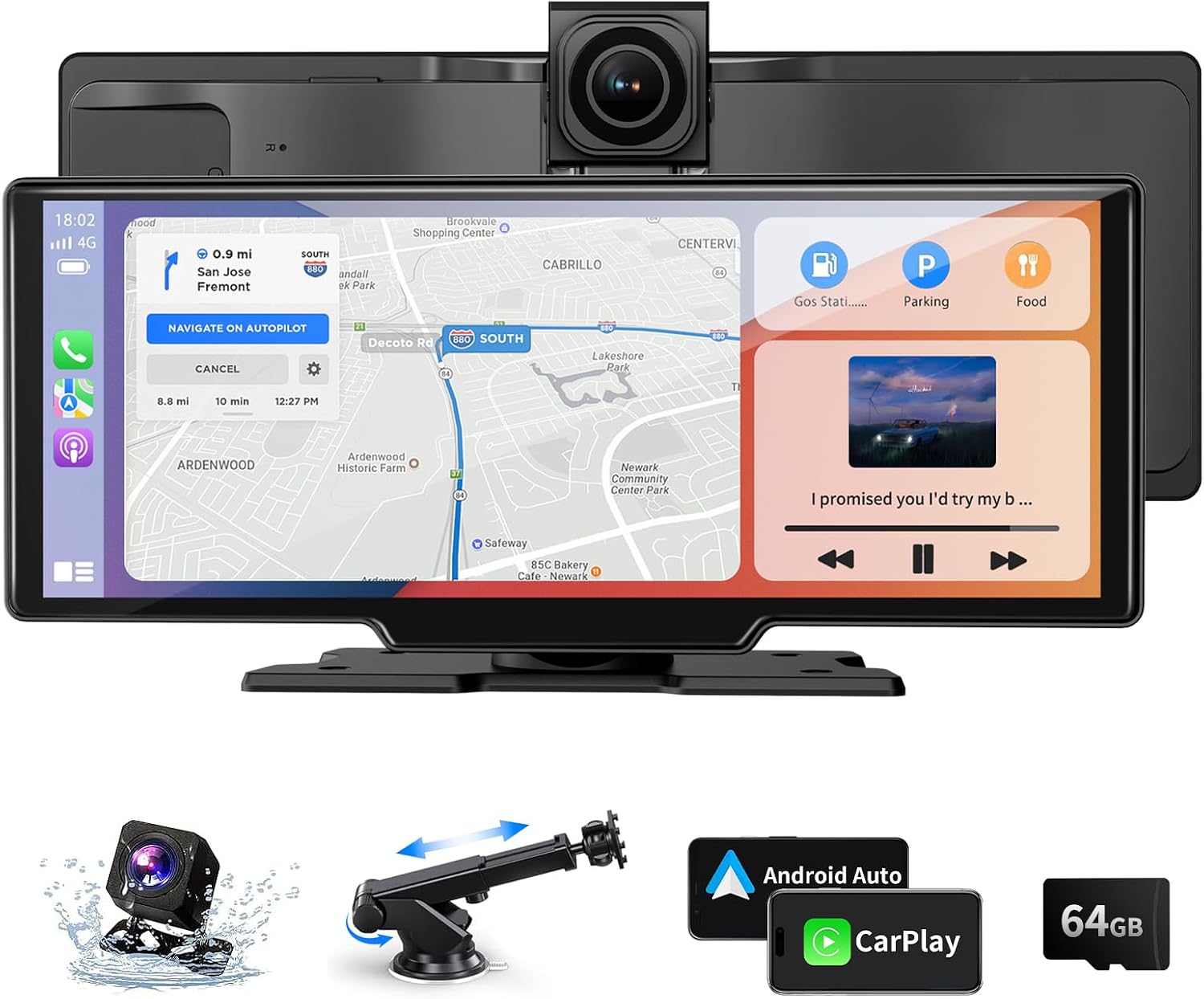
●10.26'' Wireless Carplay Android Auto Screen, Carplay Screen for Car with 4K Front Camera and 1080P Rear Camera
1. Our in-car screen is controlled by touch screen, real-time control, and responsive. Built-in screen saver, can be set: off/10s/30s/1min.
2. The car screen can be wirelessly connected through the Bluetooth function, and it supports IOS10 and above or Android 11.0 and above.
3. The stand for Android can be rotated and adjusted 360°, and the viewing angle can be adjusted according to needs, with a friendly design.
4. The car tablet provides: Bluetooth/AUX/FM/built-in speaker 4 sound output mode, which can be set according to your own needs.

Wireless Carplay (Support IOS 10 and above)
1. Click Carplay on the home page of the wireless Carplay screen.
2. Turn on your phone's Bluetooth and pair it with the car screen.
3. On the new page that appears on your phone, click "Use CarPlay".
Wireless Android Auto (Support Android 11 and above)
1. Click Android Auto on the home page of the wireless Android Auto screen.
2. Turn on your phone's Bluetooth and pair it with the car screen.
3. On the new page that appears on your phone, click "Use Android Auto" .
Note:
If your phone is running Android 16, frequent disconnections may occur while using Android Auto. Please follow the steps below to fix this issue.
1.Search for and download EVELink from Google Play on your phone.
2.On the smart screen, switch to SuperLink (Android mode).
3.Launch the EVELink app on your phone, then connect to the smart screen.
4.Wait for the message "Android 16 Auto Connect issue Fixed" to appear in the EVELink app. Once shown, tap OK.
5.Switch to Android Auto mode and connect your phone. Confirm that Android Auto no longer disconnects.

Backup Camera
1080P HD rear camera with clear reversing image provides a safer and more reliable driving experience.

Light-sening-Design
Equipped with light sensor, the smart screen can automatically adjust the screen brightness according to the light change.
10.26" Touchscreen
10.26" large touch screen, can be split or full screen display, touch responsive to meet driving needs.


Loop Recording & Collision Sensitivity
1.Insert the SD card, clear the cache and start recording images in a loop, automatically overwrite the earlier time images, no need to clear the cache manually.
2.Carplay screen has built-in collision sensitivity sensor, when the vehicle collision, it will automatically lock the image at that time, and won't be overwritten automatically.

Product List:
10.26 inch screen: with 4K front camera + short bracket, resolution 1600*600
1080P rear camera: IP65 protection
64GB SD card: support inserting 32GB-256GB SD card
Cigarette lighter cable: 7-32V/3A
5.5m rear camera cable (only suitable for small cars to install the rear camera use, if you need longer cable, please buy your own)
AUX cable: connects the screen to the car stereo.
Product Attributes:
Operating temperature: -4~149°F (-20~65°C)
Support 8 languages: English/French/German/Japanese/Korean/Russian/Spanish/Chinese
Split/Full Screen
Brightness Adjustment: Auto/Manual
Similar suggestions by Bolo
More from this brand
Similar items from “Car Stereos”
Share with
Or share with link
https://www.bolo.qa/products/KO0QPTP3IFU
Visit the Veralady Store
10.26" CarPlay Screen for Car
Imported From: United Kingdom
At BOLO, we work hard to ensure the products you receive are new, genuine, and sourced from reputable suppliers.
Every product in the BOLO catalogue is sourced through our Verified Global Supply Network of verified sellers, authorized distributors or directly from the manufacturer.
Each product undergoes thorough inspection and verification at our consolidation and fulfilment centers to ensure it meets our strict authenticity and quality standards before being shipped and delivered to you.
If you ever have concerns regarding the authenticity of a product purchased from us, please contact Bolo Support. We will review your inquiry promptly and, if necessary, provide documentation verifying authenticity or offer a suitable resolution.
Your trust is our top priority, and we are committed to maintaining transparency and integrity in every transaction.
While we strive to display accurate information, variations in packaging, labeling, instructions, or formulation may occasionally occur due to regional differences or supplier updates. For detailed or manufacturer-specific information, please contact the brand directly or reach out to BOLO Support for assistance.
Unless otherwise stated, all prices displayed on the product page include applicable taxes and import duties.
BOLO operates in accordance with the laws and regulations of Qatar. Any items found to be restricted or prohibited for sale within the Qatar will be cancelled prior to shipment. We take proactive measures to ensure that only products permitted for sale in Qatar are listed on our website.
All items are shipped by air, and any products classified as “Dangerous Goods (DG)” under IATA regulations will be removed from the order and cancelled.
All orders are processed manually, and we make every effort to process them promptly once confirmed. Products cancelled due to the above reasons will be permanently removed from listings across the website.
Description:
Details:
| Brand | Veralady |
|---|---|
| Model name | RM |
| Vehicle service type | Car |
| Screen size | 10.26 Inches |
| Connectivity technology | Bluetooth, AUX, FM |
| Map type | Road |
| Mounting type | Tripod |
| Resolution | 1600x600 |
| Product dimensions | 26.1L x 26.1W x 26.1H centimetres |
| Memory storage capacity | 64 GB |
●10.26'' Wireless Carplay Android Auto Screen, Carplay Screen for Car with 4K Front Camera and 1080P Rear Camera
1. Our in-car screen is controlled by touch screen, real-time control, and responsive. Built-in screen saver, can be set: off/10s/30s/1min.
2. The car screen can be wirelessly connected through the Bluetooth function, and it supports IOS10 and above or Android 11.0 and above.
3. The stand for Android can be rotated and adjusted 360°, and the viewing angle can be adjusted according to needs, with a friendly design.
4. The car tablet provides: Bluetooth/AUX/FM/built-in speaker 4 sound output mode, which can be set according to your own needs.
Wireless Carplay (Support IOS 10 and above)
1. Click Carplay on the home page of the wireless Carplay screen.
2. Turn on your phone's Bluetooth and pair it with the car screen.
3. On the new page that appears on your phone, click "Use CarPlay".
Wireless Android Auto (Support Android 11 and above)
1. Click Android Auto on the home page of the wireless Android Auto screen.
2. Turn on your phone's Bluetooth and pair it with the car screen.
3. On the new page that appears on your phone, click "Use Android Auto" .
Note:
If your phone is running Android 16, frequent disconnections may occur while using Android Auto. Please follow the steps below to fix this issue.
1.Search for and download EVELink from Google Play on your phone.
2.On the smart screen, switch to SuperLink (Android mode).
3.Launch the EVELink app on your phone, then connect to the smart screen.
4.Wait for the message "Android 16 Auto Connect issue Fixed" to appear in the EVELink app. Once shown, tap OK.
5.Switch to Android Auto mode and connect your phone. Confirm that Android Auto no longer disconnects.
Backup Camera
1080P HD rear camera with clear reversing image provides a safer and more reliable driving experience.
Light-sening-Design
Equipped with light sensor, the smart screen can automatically adjust the screen brightness according to the light change.
10.26" Touchscreen
10.26" large touch screen, can be split or full screen display, touch responsive to meet driving needs.
Loop Recording & Collision Sensitivity
1.Insert the SD card, clear the cache and start recording images in a loop, automatically overwrite the earlier time images, no need to clear the cache manually.
2.Carplay screen has built-in collision sensitivity sensor, when the vehicle collision, it will automatically lock the image at that time, and won't be overwritten automatically.
Product List:
10.26 inch screen: with 4K front camera + short bracket, resolution 1600*600
1080P rear camera: IP65 protection
64GB SD card: support inserting 32GB-256GB SD card
Cigarette lighter cable: 7-32V/3A
5.5m rear camera cable (only suitable for small cars to install the rear camera use, if you need longer cable, please buy your own)
AUX cable: connects the screen to the car stereo.
Product Attributes:
Operating temperature: -4~149°F (-20~65°C)
Support 8 languages: English/French/German/Japanese/Korean/Russian/Spanish/Chinese
Split/Full Screen
Brightness Adjustment: Auto/Manual
Similar suggestions by Bolo
More from this brand
Similar items from “Car Stereos”
Share with
Or share with link
https://www.bolo.qa/products/KO0QPTP3IFU